

Introduction
Base URL
The base url is https://api.xbo.com
As per RESTful design patterns, XBO Client API uses following HTTP methods:
GET- Read resourcesPOST- Create new resourcesPUT- Modify existing resourcesDELETE- Remove resources
When you are making a request, you can pass arguments in it as:
- Parameters
- Valid JSON with
application/jsonheader.
Timestamps and other time-related fields are in milliseconds.
Data in response is listed in chronological order, newest on top.
Parameters for GET endpoints must be sent as a query string.
Parameters For POST, PUT, and DELETE endpoints may be sent as a query string or in the request body with content type application/json. You can mix parameters between both the query string and request body.
Parameters can be sent in any order.
If a parameter is sent in both the query string and request body, the query string parameter will be used.
Postman
We provide postman collections and environments for quick and easy use:
Return codes
200 Successful Request.
201 Created successfully.
400 Bad Request. Check the format of your request for mistakes and try again.
401 Unauthorized. Check if your API key is eligible for using the endpoint.
500 Server Error. Issue on our side. Contact XBO Customer Support for more information.
404 Resource is missing. Contact XBO Customer Support for more information.
Error responses
Most error responses use the same shape, regardless of the status code.
Error Response Example
{
    "code": "currency-not-supported",
    "message": "ViBAN deposits are not supported for currency 'CHF'",
    "errors": {}
}
| Name | Type | Description |
|---|---|---|
code |
string |
Machine-readable error code. |
message |
string |
Human-readable error description. |
errors |
object |
Per-field validation details, when applicable. |
Requests that fail field-level validation return a different body, which has no code field. Field names in it are camelCase, and several fields may fail at once. See ViBAN deposit error handling for the shape and an example.
A 404 response carries the message only, with no code, for example when a currency code is unknown or is not a fiat currency.
Not Found Response Example
{
    "message": "Currency XYZ not found or is not Fiat"
}
A 401 response has an empty body.
Branch on the HTTP status code first, and then on code when it is present. Use code for programmatic handling, and treat message as human-readable text that may change.
All unexpected errors return 500 with the body {"code": "server-error", "message": "Server Error"}. Raw exception text is not exposed.
An upstream failure on the fiat endpoints is returned as a real 500, and not as a 400. This means the standard retry logic (retry on 5xx, do not retry on 4xx) behaves correctly.
Authentication
API Key
To access Client API endpoints you have to obtain API Key and secret. Starting 09/12/2024, We added a possibility for customers to generate and manage Client API credentials directly from Client Area.
For the customers with this functionality enabled, it can be accessed in their account Security settings.
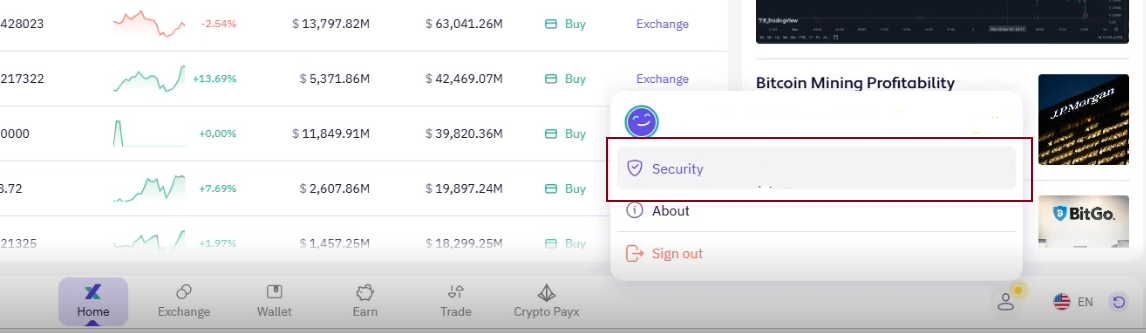
The following API key management functionality is possible within the Client Area: - New API key request. Multiple pairs (key/secret) can be requested for Client API. - Delete the existing API key. - Reset. Delete the existing API key and create a new one.
// C# example
using System.Security.Cryptography;
using System.Text;
using Newtonsoft.Json;

var apiKey = "<apiKey>";
var apiSecret = "<apiSecret>";


var client = new HttpClient
{
    BaseAddress = new Uri("https://api.xbo.com")
};

var pathWithQuery = "/v1/test-api?testParam1=test1&testParam2=test2";
var pathWithOutQuery = "/v1/test-api";
var requestBody = JsonConvert.SerializeObject(
            new
            {
                testProperty1 = "test1",
                testProperty2 = "test12"
            });

var request = new HttpRequestMessage()
{
    Method = HttpMethod.Post,
    Content = new StringContent(requestBody, Encoding.UTF8, "application/json"),
    RequestUri = new Uri($"{pathWithQuery}", UriKind.Relative)
};

using HMACSHA256 hmac = new HMACSHA256(Convert.FromBase64String(apiSecret));
using var sha256 = SHA256.Create();

var contentHash = Convert.ToBase64String(sha256.ComputeHash(Encoding.UTF8.GetBytes(content)));
var timestamp = DateTimeOffset.Now.ToUnixTimeMilliseconds();
var signatureString = $"{timestamp}{request.Method}{pathWithOutQuery}{contentHash}";

var signatureHash = hmac.ComputeHash(Encoding.UTF8.GetBytes(signatureString));
request.Headers.Add("XBO-API-KEY", apiKey);
request.Headers.Add("XBO-API-SIGN", Convert.ToBase64String(signatureHash));
request.Headers.Add("XBO-API-TIMESTAMP", timestamp.ToString());

var response = await client.SendAsync(request);
// ...
//JavaScript example
const crypto = require('crypto');
const request = require('request');

const apiKey = "<apiKey>";
const apiSecret = "<apiSecret>";
const pathWithOutQuery = "/v1/test-api";

const req = {
    method: 'POST',
    url: '/v1/test-api?testParam1=test1&testParam2=test2',
    body: JSON.stringify({testProperty1:"test1",testProperty2:"test2"})
};
const timestamp = Math.floor(Date.now());
const contentHash = crypto.createHash("sha256").update(req.body).digest().toString("base64");
const signatureString = timestamp + req.method + pathWithOutQuery + contentHash;
const signature = crypto.createHmac("sha256",  Buffer.from(apiSecret, "base64")).update(Buffer.from(signatureString,"utf8")).digest().toString("base64");

const options = {
    baseUrl: 'https://api.xbo.com',
    url: req.url,
    method: req.method,
    headers: {
        'XBO-API-SIGN': signature,
        'XBO-API-TIMESTAMP': timestamp,
        'XBO-API-KEY': apiKey,
        'content-type': 'application/json'
    },
    body: req.body
};

request(options,function(err, response){
  // ...
}
//PHP example
<?php

declare(strict_types=1);

$apiKey = '';
$apiSecret = '';
$apiBaseUrl = 'https://api.xbo.com';
$pathWithOutQuery = '/v1/test-api';

$request = [
    'method' => 'POST',
    'url' => $pathWithOutQuery . '?testParam1=test1&testParam2=test2',
    'body' => json_encode(['testProperty1' => 'test1', 'testProperty2' => 'test2']),
];
$timestamp = time();
$signature = generateSignature($apiSecret, $timestamp, $request['url'], $request['method'], $request['body']);

$curl = curl_init();
curl_setopt_array($curl, [
    CURLOPT_URL => $apiBaseUrl . $request['url'],
    CURLOPT_TIMEOUT => 30,
    CURLOPT_CUSTOMREQUEST => $request['method'],
    CURLOPT_POSTFIELDS => $request['body'],
    CURLOPT_HTTPHEADER => [
        'Content-Type: application/json',
        'XBO-API-KEY: ' . $apiKey,
        'XBO-API-SIGN: ' . $signature,
        'XBO-API-TIMESTAMP: ' . $timestamp,
    ],
]);

$response = curl_exec($curl);
$err = curl_error($curl);

curl_close($curl);

if ($err) {
    echo 'cURL Error #:' . $err;
} else {
    echo 'Response Code: ' . curl_getinfo($curl, CURLINFO_HTTP_CODE) . PHP_EOL;
    echo 'Response: ' . $response;
}

function generateSignature(
    string $apiSecret,
    int $timestamp,
    string $uriPath,
    string $httpMethod,
    ?string $requestBody = null,
): string {
    $requestBodyHash = '';

    if ($requestBody !== null) {
        $requestBodyHash = base64_encode(hash('sha256', $requestBody, true));
    }

    $signature = sprintf('%d%s%s%s', $timestamp, $httpMethod, $uriPath, $requestBodyHash);
    $hmacKey = base64_decode($apiSecret, true);

    return base64_encode(hash_hmac('sha256', $signature, $hmacKey, true));
}
Make sure to replace
<apiKey>and<apiSecret>with your API key and secret respectively.
Making request
All requests to authorized endpoints must contain the following headers:
XBO-API-KEY - API Key
XBO-API-SIGN - Signature (see below)
XBO-API-TIMESTAMP - request timestamp
All request bodies should have content type application/json and be valid JSON
Also send a descriptive User-Agent header. Requests without one may be blocked by the edge firewall.
Selecting timestamp
XBO-API-TIMESTAMP must be number of milliseconds since
UNIX Epoch. It should be within 60 seconds of the API service time to be considered as valid.
Signing message
Signature is generated by creating a SHA256 HMAC using the API secret on the string timestamp + method + path + contentHash
- timestamp - the same value as
XBO-API-TIMESTAMP - method - HTTP method in UPPER CASE
- path - path of the URL without the query string
- contentHash -
base64encodedSHA256hash of the raw request body bytes (empty for GET requests)
Send the exact bytes you hashed. Re-serializing the JSON after signing, with a different key order, whitespace or number formatting, changes the hash and yields a 401.
Currencies & Networks
Get a list of all currencies and networks
Use this endpoint to get a list of all the currencies allowed by the regulation of your region and, in case of cryptocurrencies, with their networks listed as well.
HTTP Request
GET /v1/currencies/
Successful Response
  {
    "currency": "string",
    "type": "string",
    "networks": [
      {
        "addressType": 0,
        "IsTagRequiredForWithdrawals": false,
        "code": "string",
        "name": "string"
      }
    ]
  }
Response Fields
| Name | Type | Description |
|---|---|---|
currency |
string |
Acronym of currency. |
type |
string |
Type of currency. |
addressType |
string |
Type of network. |
IsTagRequiredForWithdrawals |
boolean |
Is TAG, MEMO, or NOTE field required (true) or optional (false) for the currency, in case its addressType is MultipleWithTag, MultipleWithMemo, or MultipleWithNote respectively. |
code |
string |
Acronym (code) of network. |
name |
string |
Name of network. |
Deposit Fiat
XBO makes it possible to deposit funds to your account via wire transfer, or via a bank transfer to a virtual IBAN (ViBAN).
Deposit via wire transfer
To initiate the deposit via wire transfer, you need to use the endpoints below in the following order:
- Get a list of available bank accounts for your country and currency of choice.
- Get a fee quote calculated for your deposit amount.
- Initiate a wire transfer deposit with the currency and sum you want to deposit and bank details of your bank.
In the response to the third endpoint you will get XBO bank details, where you need to transfer your funds.
After the wire transfer deposit has been initialized, its transaction status will be Pending.
Once we have received the sum of deposit, the funds will appear on your trading account and transaction status will become Completed.
Track your deposit status using Fiat transactions history deposit.
Get a list of available bank accounts
HTTP Request
GET /v1/fiat/deposits/wire-transfer/bank-accounts?countryIso2={countryIso2}¤cy={currency}
Parameters
| Name | Type | Required | Description |
|---|---|---|---|
countryIso2 |
string |
+ | Two-letter code of your country, in ISO 3166-2 format. |
currency |
string |
+ | Fiat currency in which you want to make a wire transfer. In three-letter ISO 4217 format. |
Successful Response (countryIso2=UA,currency=USD)
[
    {
        "id": 5832,
        "minDepositAmount": 5.10,
        "depositFeeFixedAmount": 5.00,
        "depositFeePercentAmount": 1.00,
        "currency": "USD",
        "bankName": "(USD) UA Test Bank",
        "iban": "(USD)UA458247823336334351911799216"
    },
    {
        "id": 5835,
        "minDepositAmount": 7.50,
        "depositFeeFixedAmount": 5.00,
        "depositFeePercentAmount": 0.00,
        "currency": "USD",
        "bankName": "(NEW_USD) UA Test Bank",
        "iban": "(NEW)UA458247823336334351911799216"
    }
]
Response Fields
| Name | Type | Description |
|---|---|---|
id |
number($int32) |
Bank unique ID. Use it to calculate the fee in the next endpoint. |
minDepositAmount |
number($decimal) |
Minimum amount of deposit that can be made to the bank. |
depositFeeFixedAmount |
number($decimal) |
Fixed deposit fee. |
depositFeePercentAmount |
number($decimal) |
Deposit amount percentage fee. |
currency |
string |
Currency that needs to be deposited. In three-letter ISO 4217 format. |
bankName |
string |
Full bank name. |
iban |
string |
Bank IBAN. |
Fee quote for deposit amount
HTTP Request
POST /v1/fiat/deposits/wire-transfer/fee
Request Body Example
{
  "amount": 100,
  "currency": "USD",
  "countryIso2": "UA",
  "bankAccountId": 5832
}
Parameters
| Name | Type | Required | Description |
|---|---|---|---|
amount |
number($decimal) |
+ | The amount you want to transfer. |
currency |
string |
+ | Fiat currency in which you want to make a wire transfer. In three-letter ISO 4217 format. |
countryIso2 |
string |
+ | Two-letter code of your country, in ISO 3166-2 format. |
bankAccountId |
number($int32) |
+ | ID bank you've chosen to transfer deposit to in the previous endpoint. |
Successful Response
{
    "netAmount": 94.00,
    "feeAmount": 6.00,
    "grossAmount": 100.0
}
Response Fields
| Name | Type | Description |
|---|---|---|
netAmount |
number($decimal) |
The amount that will be deposited on your XBO account. Fee excluded. |
feeAmount |
number($decimal) |
The amount of fee that will be deducted from the amount you transfer. |
grossAmount |
number($decimal) |
Total amount that you want to transfer. |
Initiate deposit via wire transfer
HTTP Request
POST /v1/fiat/deposits/wire-transfer
Request Body Example
{
  "netAmount":94.00,
  "feeAmount":6.00,
  "currency":"USD",
  "customerBankName":"string",
  "customerIban":"UA458247823336334361411799216",
  "customerBankCountryIso2":"UA",
  "bankAccountId":5832
}
Parameters
| Name | Type | Required | Description |
|---|---|---|---|
netAmount |
number($decimal) |
+ | The amount that will be deposited on your XBO account. Fee excluded. |
feeAmount |
number($decimal) |
+ | The amount of fee that will be deducted from the amount you transfer. |
currency |
string |
+ | Fiat currency in which you want to make a wire transfer. In three-letter ISO 4217 format. |
customerBankName |
string |
+ | Name of the bank you will be making a wire transfer from. |
customerIban |
string |
+ | IBAN of the account you will be making a wire transfer from. |
customerBankCountryIso2 |
string |
+ | Two-letter code of your bank's country, according to ISO 3166-2. |
bankAccountId |
number($int32) |
+ | ID of the bank you have chosen to transfer deposit to in the first endpoint and calculated the commission for. |
Successful Response (make a wire transfer with these recipient details)
{
    "amount": 100.00,
    "recipient": "(USD) Test Account",
    "bankAddress": "(USD) 54/19 AVTOZAVODSKAYA STR 1",
    "bankZip": "(USD) 01001",
    "bankCity": "(USD) Kyiv",
    "bankCountry": "(USD) Ukraine",
    "swiftCode": "(USD) UNJSUAUK",
    "iban": "(USD)UA458247823336334351911799216",
    "paymentReference": "TXN58444",
    "referenceNumber": "(USD)Reference",
    "routingNumber": ""
}
Response Fields
| Name | Type | Description |
|---|---|---|
amount |
number($decimal) |
The amount that you need to transfer. |
recipient |
string |
The name of the bank you need to make wire transfer to (recipient bank). |
bankAddress |
string |
The address of recipient bank. |
bankZip |
string |
ZIP code of recipient bank. |
bankCity |
string |
City of recipient bank. |
bankCountry |
string |
Country of recipient bank. |
swiftCode |
string |
SWIFT of recipient bank. |
iban |
string |
Recipient bank IBAN. |
paymentReference |
string |
Internal reference of deposit transaction. |
referenceNumber |
string |
Reference number of recipient bank. |
routingNumber |
string |
Routing number of recipient bank. |
Deposit via ViBAN
XBO also makes it possible to deposit fiat funds to your account via a bank transfer to a virtual IBAN (ViBAN) of your personal account.
To initiate the deposit via ViBAN, you need to use the endpoints below in the following order:
- Optional. Get a fee quote calculated for your deposit amount.
- Initiate a ViBAN deposit with the currency and gross sum you want to deposit. In the response you will get the bank transfer instructions.
- Transfer the funds. Transfers of an amount different than requested, are matched automatically.
- Once the incoming transfer is matched, the deposit transaction status becomes
Completedand the net amount is credited to your balance.
Track your deposit status using Fiat transactions history, or subscribe to Fiat deposit notification to be notified on every status change.
Fee quote for ViBAN deposit amount
Returns the fee structure for the deposit amount and currency you specify. The quote is informational only, and the fee is recalculated when the deposit is created.
HTTP Request
POST /v1/fiat/deposits/viban/fee
Request Body Example
{
  "amount": 150.00,
  "currency": "EUR"
}
Parameters
| Name | Type | Required | Description |
|---|---|---|---|
amount |
number($decimal) |
+ | The gross amount you want to transfer. |
currency |
string |
+ | Fiat currency in which you want to make the transfer. In three-letter ISO 4217 format, case-insensitive. |
Successful Response
{
    "netAmount": 148.00,
    "feeAmount": 2.00,
    "grossAmount": 150.00,
    "currency": "EUR"
}
Response Fields
| Name | Type | Description |
|---|---|---|
netAmount |
number($decimal) |
The amount that will be deposited on your XBO account. Fee excluded. |
feeAmount |
number($decimal) |
The amount of fee that will be deducted from the amount you transfer. |
grossAmount |
number($decimal) |
Total amount that you want to transfer. |
currency |
string |
Currency of the deposit. In three-letter ISO 4217 format. |
Initiate deposit via ViBAN
Creates a Pending deposit and returns the bank transfer instructions you need to follow.
HTTP Request
POST /v1/fiat/deposits/viban
Request Body Example
{
  "amount": 210.00,
  "currency": "EUR",
  "clientIp": "91.218.89.10"
}
Parameters
| Name | Type | Required | Description |
|---|---|---|---|
amount |
number($decimal) |
+ | The gross amount you will transfer. Should be greater than zero, with max 2 decimal places. |
currency |
string |
+ | Fiat currency in which you will make the transfer. In three-letter ISO 4217 format, case-insensitive (eur is accepted as EUR). Currently supported currencies are EUR, USD, GBP. An unsupported currency returns currency-not-supported. |
clientIp |
string |
+ | IP address of your end customer, in IPv4 dotted-quad or IPv6 format. Used by the payment provider for fraud checks. Pass the real customer IP, not the IP of your integrating server. There is no fallback to the connection IP. |
Successful Response (make a bank transfer with these recipient details)
{
    "transactionId": 217164,
    "status": "Pending",
    "amount": 210.00,
    "feeAmount": 2.00,
    "netAmount": 208.00,
    "currency": "EUR",
    "instructions": {
        "iban": "GB04SEOU19870010471267",
        "bic": "SEOUGB21",
        "bankName": "Simulator Bank",
        "bankCountry": "United Kingdom",
        "bankAddress": "The Bower, 207-211 Old Street, London, England, EC1V 9NR",
        "accountHolderName": "CRYPTOPAY CRYPTOPAY",
        "accountNumber": "010471267",
        "amount": 210.00,
        "currency": "EUR"
    }
}
Response Fields
| Name | Type | Description |
|---|---|---|
transactionId |
number($int32) |
Unique ID of the deposit transaction. It is used in Fiat deposit notification and in Fiat transactions history. |
status |
string |
Status of the deposit. Always Pending at creation. See ViBAN deposit statuses. |
amount |
number($decimal) |
Gross amount you need to transfer. |
feeAmount |
number($decimal) |
The amount of fee that will be deducted from the amount you transfer. |
netAmount |
number($decimal) |
The amount that will be credited to your balance (gross amount minus fee). |
currency |
string |
Currency of the deposit. In three-letter ISO 4217 format. |
instructions |
object |
Bank transfer details to follow, or to display to your end customer. See the fields below. |
instructions Fields
| Name | Type | Description |
|---|---|---|
iban |
string |
IBAN of the recipient virtual account. |
bic |
string |
BIC/SWIFT code of the recipient bank. |
bankName |
string |
Full name of the recipient bank. |
bankCountry |
string |
Country of the recipient bank. |
bankAddress |
string |
Address of the recipient bank. |
accountHolderName |
string |
Account holder name of the recipient virtual account. |
accountNumber |
string |
Account number of the recipient virtual account. |
amount |
number($decimal) |
The exact amount that needs to be transferred. |
currency |
string |
The currency in which the transfer needs to be made. In three-letter ISO 4217 format. |
The transfer needs to be made for exactly instructions.amount in instructions.currency, to the specified IBAN, in a single transfer.
accountHolderName and accountNumber identify your personal virtual account, so the instructions can be reused visually between deposits. However, every deposit expects its own separate transfer.
ViBAN deposit statuses
Status of the deposit can have the following values.
| Status | Comment |
|---|---|
Pending |
The deposit is created, and is awaiting a matching incoming bank transfer. |
Completed |
The incoming transfer is matched, and the net amount is credited to your balance. |
Declined |
The deposit is declined, for example rejected during review. The webhook notification carries a Reason. |
Failed |
The deposit failed, or was blocked on the payment provider side. |
ViBAN deposit error handling
The ViBAN deposit endpoints return two different error bodies.
Request validation errors are returned when a required field is missing, or when a field value has the wrong format or is out of range. This covers a missing or malformed clientIp, and an amount that exceeds 2 decimal places, is not a positive number, or is below the minimum. These responses do not contain a code field.
Request validation error example (missing or invalid
clientIp)
{
    "errors": {
        "clientIp": [
            "The clientIp field must be a valid IPv4 or IPv6 address"
        ]
    },
    "type": "https://tools.ietf.org/html/rfc9110#section-15.5.1",
    "title": "One or more validation errors occurred.",
    "status": 400,
    "traceId": "00-0af7651916cd43dd8448eb211c80319c-b7ad6b7169203331-01"
}
Response Fields
| Name | Type | Description |
|---|---|---|
errors |
object |
Validation messages, keyed by the name of the request field that failed. Each value is an array of messages. |
type |
string |
URI of the problem type. |
title |
string |
Generic title of the failure. Always One or more validation errors occurred. for request validation errors. |
status |
number($int32) |
HTTP status code of the response. |
traceId |
string |
Trace ID of the request. Quote it when contacting XBO Customer Support. |
Other errors follow the standard Client API error shape.
Error example
{
    "code": "currency-not-supported",
    "message": "ViBAN deposits are not supported for currency 'CHF'",
    "errors": {}
}
Error codes for the ViBAN deposit endpoints can be:
| HTTP Code | Code | Description |
|---|---|---|
400 |
currency-not-supported |
The currency is not enabled for ViBAN deposits. |
400 |
method-not-available |
ViBAN deposits are temporarily unavailable as a payment method. |
400 |
deposit-locked |
A deposit with the same data (amount and currency) was created recently. Change the amount, or retry later. Message: A deposit with the same data was created recently; change the amount or retry later. |
400 |
email-required |
The customer profile has no email address, which is required by the payment provider. |
400 |
company-data-required |
A corporate customer profile is missing the company name or the registration number. |
400 |
country-not-supported |
ViBAN deposits are unavailable for the customer's country. |
400 |
account-not-ready |
The customer's virtual IBAN account is still being provisioned. This happens on first use, and is transient. Retry later. |
400 |
payment-rejected |
The payment provider rejected the deposit for another reason. |
400 |
entity-not-valid |
Generic validation failure for the deposit. Field-level problems in the request are reported as request validation errors instead, see above. |
400 |
entity-not-found |
The customer could not be resolved for ViBAN processing. |
500 |
server-error |
Unexpected failure. It is safe to retry with the same data, as a deposit is never silently created on a 500. A repeated identical request may return deposit-locked. |
The generic deposit limit errors, for example an amount exceeding your deposit limit, apply to both ViBAN endpoints unchanged.
Deposit Crypto
Get a unique deposit address
You can request a unique deposit address for each coin and network.
HTTP Request
POST /v2/deposit-addresses/
Request Body Example
{
    "currency": "BTC",
    "networkCode": "BTC_TEST",
    "addressType": "Additional",
    "clientTag": "tests"
}
Parameters
| Name | Type | Required | Description |
|---|---|---|---|
currency |
string |
+ | Symbol of the cryptocurrency in acronym format, e.g., ETH, BTC, USDT, etc. |
networkCode |
string |
+ | The chain network code for the currency, e.g., for USDT - OMNI, ERC20, TRC20. |
addressType |
string |
+ | Address type. Can be: Primary, Additional, UniqueTag. |
clientTag |
string |
Required for "addressType" = "UniqueTag", always empty for "addressType" = "Primary", optional for "addressType" = "Additional" |
Unique client's identifier in external system. |
Successful Response
{
    "currency": "BTC",
    "address": "tb1qpcz67g5fv6y5vhrtvmxmqtnsg2zv5pxclece5n",
    "destinationTag": "string",
    "destinationTagType": "string",
    "addressType": "Additional",
    "clientTag": "testtag1"
}
Response Fields
| Name | Type | Description |
|---|---|---|
currency |
string |
Symbol of wallet's currency in acronym format, e.g., ETH, BTC, USDT, etc. |
address |
string |
One-time Address of the wallet. |
destinationTag |
string |
Additional address info of network, if applicable. Used for tag, memo and notes of the network. |
destinationTagType |
string |
Type of the info in destinationTag field. |
addressType |
string |
Address type. Can be: Primary, Additional, UniqueTag. |
clientTag |
string |
Unique client's identifier in external system. |
Get a list of all crypto addresses
You can request the list of all the cryptowallets belonging to you as an XBO client.
HTTP Request
GET /v2/deposit-addresses/
Parameters
| Name | Type | Required | Description |
|---|---|---|---|
address |
string |
Wallet address. Use this parameter, to check if the exact wallet address belongs to your client account, and display its details. | |
networkCode |
string |
The chain network code for the currency, e.g., for USDT - OMNI, ERC20, TRC20. | |
clientTag |
string |
Unique client's identifier in external system. |
Successful Response
[
    {
        "currency": "XRP",
        "networkCode": "XRP_TEST",
        "address": "rBo6XnbVWFzfdCxfX9Ym4mmcEQtoMNr3Gh",
        "destinationTag": "1128467660",
        "type": "Additional",
        "clientTag": "12346"
    },
    {
        "currency": "BTC",
        "networkCode": "BTC_TEST",
        "address": "tb1q72xg8d4w0avuzvj3fzerr76vcumve96smnlhvk",
        "destinationTag": "string",
        "type": "UniqueTag",
        "clientTag": "123467"
    }
]
Response Fields
| Name | Type | Description |
|---|---|---|
currency |
string |
Symbol of wallet's currency in acronym format, e.g., ETH, BTC, USDT, etc. |
networkCode |
string |
The chain network code for the currency, e.g., for USDT - OMNI, ERC20, TRC20. |
address |
string |
Address of the wallet. |
destinationTag |
string |
Additional address info of network, if applicable. Used for tag, memo and notes of the network. |
type |
string |
Address type. Can be: Primary, Additional, UniqueTag. |
clientTag |
string |
Unique client's identifier in external system. |
Convert
XBO Client API gives you the possibility to execute Convert transactions.
List currency pairs
See List all currencies and networks for more information.
Request for conversion quote
Send the request to get the conversion rate for your selected currency pair, from the currencies allowed by the regulation of your region in selected amount.
HTTP Request
POST /v1/otc-trading/request-for-quote/
Request Body Example
{
  "fromCurrency": "string",
  "toCurrency": "string",
  "fromAmount": 0,
  "toAmount": 0
}
Parameters
| Name | Type | Required | Description |
|---|---|---|---|
fromCurrency |
string |
+ | Acronym of the currency you want to convert FROM. |
toCurrency |
string |
+ | Acronym of the currency you want to convert your existing currency TO. |
fromAmount |
double |
Select one parameter out of two, otherwise your request will be invalid. | Amount of the currency you want to convert FROM. |
toAmount |
double |
Amount of the currency you want to convert your existing currency TO. |
Successful Response
{
  "id": "3fa85f64-5717-4562-b3fc-2c963f66afa6",
  "occuredOn": "2022-12-31T12:56:01.776Z",
  "validTo": "2022-12-31T12:56:01.776Z",
  "fromCurrency": "string",
  "toCurrency": "string",
  "amountFrom": 0,
  "amountTo": 0,
  "rate": 0
}
Response Fields
| Name | Type | Description |
|---|---|---|
id |
string |
Unique ID of request. |
occuredOn |
string(dateTime) |
Time when the request reached our server. |
validTo |
string(dateTime) |
Time until the stated rate is valid. If the time has elapsed, you need to send another request to convert your funds. |
fromCurrency |
string |
Acronym of the currency you want to convert FROM. |
toCurrency |
string |
Acronym of the currency you want to convert your existing currency TO. |
amountFrom |
decimal |
Amount of the currency you want to convert FROM. |
amountTo |
decimal |
Amount of the currency you want to convert your existing currency TO. |
rate |
decimal |
Conversion rate, relevant for your request. |
Convert funds
Place a conversion order, if you agree with the conversion rate for your selected currency pair.
HTTP Request
POST /v1/otc-trading/convert
Request Body Example
{
  "id": "string",
  "fromCurrency": "string",
  "toCurrency": "string",
  "fromAmount": 0,
  "toAmount": 0
}
Parameters
| Name | Type | Required | Description |
|---|---|---|---|
id |
string |
+ | Unique ID of request-for-quote endpoint response. |
fromCurrency |
string |
+ | Acronym of the currency you want to convert FROM. |
toCurrency |
string |
+ | Acronym of the currency you want to convert your existing currency TO. |
fromAmount |
decimal |
+ | Amount of the currency you want to convert FROM. |
toAmount |
decimal |
+ | Amount of the currency you want to convert your existing currency TO. |
In response you get the ID of the conversion transaction initiation.
Check balance on wallet
See Check account balances for more information.
Get Convert history
Display the desired number of previous records in Convert history.
HTTP Request
GET /v1/otc-trading/history
Successful Response
{
  "items": [
    {
      "id": 0,
      "operationExecutionTime": "2022-12-31T11:19:33.448Z",
      "amountFrom": 0,
      "amountTo": 0,
      "fromCurrency": "string",
      "toCurrency": "string",
      "rate": 0,
      "status": "string"
    }
  ],
  "count": 0
}
Parameters
| Name | Type | Required | Description |
|---|---|---|---|
page |
int32 |
+ | Offset, each page equals count value. For example, to get results 20-30, set page to 2, and count to 10. |
count |
int32 |
+ | How many records to return. |
Response Fields
| Name | Type | Description |
|---|---|---|
id |
int32 |
Unique transaction ID. |
operationExecutionTime |
string(dateTime) |
Time the transaction was executed. |
amountFrom |
decimal |
Amount of the currency converted FROM. |
amountTo |
decimal |
Amount of the currency converted TO. |
fromCurrency |
string |
Acronym of the currency converted FROM. |
toCurrency |
string |
Acronym of the currency converted TO. |
rate |
decimal |
Rate of conversion. |
status |
string |
Status of the transaction. |
count |
int32 |
Count of the record. |
Spot Trading
XBO Client API gives customer the access to a full range of tools for spot trading, including the possibility to:
- Create a market or limit order.
- Update and existing order with new amount and/or price.
- Cancel an existing order by ID.
- Retrieve the list of the orders that are currently open.
- Get a history of closed orders.
Get the list of pairs for trading
Use this endpoint to get a list of asset pairs, available for trading.
HTTP Request
GET /v1/spot-trading/symbols
Parameters
| Name | Type | Required | Description |
|---|---|---|---|
page |
int32 |
+ | Offset, each page equals count value. For example, to get results 20-30, set page to 2, and count to 10. |
count |
int32 |
+ | How many records to return. |
Successful Response
{
  "total": 617,
  "data": [
    {
      "symbol": "1INCH/BTC",
      "description": "1INCH/BTC",
      "baseCurrency": "1INCH",
      "quoteCurrency": "BTC",
      "minVolumeTrade": 1000,
      "maxVolumeTrade": 27586,
      "precision": 8,
      "volumeStep": 0.1
    },
    {
      "symbol": "1INCH/USD",
      "description": "USD",
      "baseCurrency": "1INCH",
      "quoteCurrency": "USD",
      "minVolumeTrade": 200,
      "maxVolumeTrade": 1000,
      "precision": 8,
      "volumeStep": 0.01
    }
  ]
}
Response Fields
| Name | Type | Description |
|---|---|---|
total |
int32 |
Total number of trading pairs. |
symbol |
string |
Acronym for the trading pair. |
description |
string |
Description of the pair. |
baseCurrency |
string |
Acronym of the base currency in the pair. |
quoteCurrency |
string |
Acronym of the quote currency in the pair. |
minVolumeTrade |
float |
The minimal amount of trade you can place an order for the pair. |
maxVolumeTrade |
float |
The maximal amount of trade you can place an order for the pair. |
precision |
int32 |
The number of decimal places allowed for the price of the trading pair. |
volumeStep |
float |
The minimal amount of increment in trade volume. |
Create an order
Use it to place a market or limit order.
HTTP Request
POST /v1/spot-trading/orders
Request Body Example
{
  "symbol": "BTC/USDT",
  "type": "Limit",
  "side": "Buy",
  "amount": 0.01,
  "price": 29000.00
}
Request Body
| Name | Type | Required | Description |
|---|---|---|---|
symbol |
string |
+ | Trading pair symbol (e.g., BTC/USDT). Only for the currencies allowed by the regulation of your region. |
type |
string |
+ | Type of the order you are making. Can be Market or Limit. |
side |
string |
+ | Buy or Sell. |
amount |
decimal |
+ | The amount of the order, must be > 0. |
price |
decimal |
Required only for limit orders | Price for limit orders. |
Successful Response
{
  "id": 444123,
  "symbol": "BTC/USDT",
  "baseCurrency": "BTC",
  "quoteCurrency": "USDT",
  "type": "Limit",
  "side": "Buy",
  "amount": 0.01,
  "initialAmount": 0.01,
  "price": 29000.00,
  "openTime": "2025-05-29T10:00:00Z",
  "updatedOn": "2025-05-29T10:00:00Z",
  "takerCommission": 0,
  "makerCommission": 0,
  "time": 0
}
Response Fields
| Name | Type | Description |
|---|---|---|
id |
long |
Unique ID of the transaction. |
symbol |
string |
Trading pair symbol. |
baseCurrency |
string |
Symbol of the base currency in the pair. |
quoteCurrency |
string |
Symbol of the quote currency in the pair. |
type |
string |
Type of the order you are making. |
side |
string |
Direction of the order. Can be "Buy" or "Sell". |
amount |
decimal |
The current amount of the order. Can differ from initialAmount in case of partial order closure. |
initialAmount |
decimal |
The initially requested amount of the order. |
price |
decimal |
The price at which the order is executed. |
openTime |
string(dateTime) |
Time at which the order was placed. |
updatedOn |
string(dateTime) |
Time at which the order was updated. |
makerCommission |
decimal |
Commission fee for order maker. |
takerCommission |
decimal |
Commission fee for order taker. |
time |
int32 |
Time in ms, passed from order placement to execution in Unix timestamp format. |
Response Codes
| Code | Description |
|---|---|
201 |
Created - order placed. |
400 |
Bad Request - invalid payload. |
401 |
Unauthorized - not authenticated. |
Replace Order
Use it to change an existing order's amount and/or price.
HTTP Request
POST /v1/spot-trading/orders/{orderId}/replace
Parameters
| Name | Type | Required | Description |
|---|---|---|---|
orderId |
long |
+ | ID of the order to change. |
Request Body
| Name | Type | Required | Description |
|---|---|---|---|
amount |
decimal |
+ | New amount, must be > 0. |
price |
decimal |
New price. If provided, must be > 0. |
Successful Response
{
  "id": 444124,
  "symbol": "BTC/USDT",
  "type": "Limit",
  "side": "Sell",
  "amount": 0.05,
  "price": 31000.00,
  "baseCurrency": "BTC",
  "quoteCurrency": "USDT",
  "takerCommission": 0.001,
  "makerCommission": 0.0005,
  "openTime": "2025-05-29T10:30:00Z",
  "updatedOn": "2025-05-29T10:35:00Z",
  "time": 5000
}
Response Fields
| Name | Type | Description |
|---|---|---|
id |
long |
Unique ID of the transaction. |
symbol |
string |
Trading pair symbol. |
type |
string |
Type of the order you are making. |
side |
string |
Direction of the order. Can be "Buy" or "Sell". |
amount |
decimal |
The current amount of the order. |
price |
decimal |
The price at which the order is executed. |
baseCurrency |
string |
Symbol of the base currency in the pair. |
quoteCurrency |
string |
Symbol of the quote currency in the pair. |
makerCommission |
decimal |
Commission fee for order maker. |
takerCommission |
decimal |
Commission fee for order taker. |
openTime |
string(dateTime) |
Time at which the order was placed. |
updatedOn |
string(dateTime) |
Time at which the order was updated. |
time |
int32 |
Time in ms, passed from order placement to execution in Unix timestamp format. |
Response Codes
| Code | Description |
|---|---|
201 |
Created - order replaced. |
400 |
Bad Request - invalid input. |
401 |
Unauthorized - not authenticated. |
Cancel Order
Cancels an existing order by ID.
HTTP Request
DELETE /v1/spot-trading/orders/{orderId}
Parameters
| Name | Type | Required | Description |
|---|---|---|---|
orderId |
long |
+ | ID of the order to cancel. |
Response Codes
| Code | Description |
|---|---|
200 |
OK - order successfully cancelled. |
400 |
Bad Request - invalid ID/state. |
401 |
Unauthorized - not authenticated. |
Get Open Orders
Returns a paginated list of all currently open orders for the authenticated customer.
HTTP Request
GET /v1/spot-trading/orders
Parameters
| Name | Type | Required | Description |
|---|---|---|---|
orderId |
long |
Filter by order ID. | |
symbol |
string |
Trading pair symbol (e.g., BTC/USDT). | |
side |
string |
Order action: Buy or Sell. |
|
from |
string(dateTime) |
Start of order creation date. | |
to |
string(dateTime) |
End of order creation date. | |
page |
int |
Page number. Default: 1. | |
count |
int |
Items per page. Default: 100. |
Successful Response
{
  "total": 1,
  "items": [
    {
      "id": 101,
      "symbol": "BTC/USDT",
      "baseCurrency": "BTC",
      "quoteCurrency": "USDT",
      "takerCommission": 0.001,
      "makerCommission": 0.0005,
      "side": "Buy",
      "type": "Limit",
      "amount": 0.5,
      "initialAmount": 1.0,
      "price": 30000.00,
      "openTime": "2024-12-31T12:00:00Z",
      "updatedOn": "2024-12-31T12:05:00Z",
      "time": 3000
    }
  ]
}
Response Fields
| Name | Type | Description |
|---|---|---|
id |
long |
Unique ID of the transaction. |
symbol |
string |
Trading pair symbol. |
baseCurrency |
string |
Symbol of the base currency in the pair. |
quoteCurrency |
string |
Symbol of the quote currency in the pair. |
type |
string |
Type of the order you are making. |
side |
string |
Direction of the order. Can be "Buy" or "Sell". |
amount |
decimal |
The current amount of the order. |
initialAmount |
decimal |
The initially requested amount of the order. |
price |
decimal |
The price at which the order is executed. |
openTime |
string(dateTime) |
Time at which the order was placed. |
updatedOn |
string(dateTime) |
Time at which the order was updated. |
makerCommission |
decimal |
Commission fee for order maker. |
takerCommission |
decimal |
Commission fee for order taker. |
time |
int32 |
Time in ms, passed from order placement to execution in Unix timestamp format. |
Response Codes
| Code | Description |
|---|---|
200 |
OK - returns order list. |
400 |
Bad Request - invalid input. |
401 |
Unauthorized - not authenticated. |
Get orders history
Returns a paginated list of closed orders for the authenticated customer.
HTTP Request
GET /v1/spot-trading/trades
Parameters
| Name | Type | Required | Description |
|---|---|---|---|
symbol |
string |
Trading pair symbol (e.g., ETH/USDT). | |
type |
string |
Filter by order type: Market, Limit. |
|
status |
string |
Filter by order status: Executed, Canceled, PartiallyExecuted. |
|
orderId |
long |
Filter by related order ID. | |
dateFrom |
string(dateTime) |
Start of trade date range. | |
dateTo |
string(dateTime) |
End of trade date range. | |
page |
int |
+ | Page number. |
count |
int |
+ | Items per page. |
Successful Response
{
  "total": 1,
  "items": [
    {
      "id": 98765,
      "price": 1500.50,
      "amount": 0.3,
      "symbol": "ETH/USDT",
      "type": "Limit",
      "side": "Sell",
      "status": "Executed",
      "baseCurrency": "ETH",
      "quoteCurrency": "USDT",
      "fee": 2.5,
      "feeCurrency": "USDT",
      "feeType": "Taker",
      "openTime": "2025-01-01T10:00:00Z",
      "tradeDate": "2025-01-01T10:02:00Z"
    }
  ]
}
Response Codes
| Code | Description |
|---|---|
200 |
OK - returns a trade list. |
400 |
Bad Request - invalid filters. |
401 |
Unauthorized - not authenticated. |
Orderbook
The orderbook endpoint is used to request a complete level 2 order book, arranged by best asks/bids, for a particular asset pair.
HTTP Request
GET /v1/spot-trading/orderbook/{symbol}?depth={depth}
Parameters
| Name | Type | Required | Description |
|---|---|---|---|
symbol |
string |
+ | Market pair for which the orderbook is requested, divided by encoded slash (%2F). Format example: BTC%2FUSDT |
depth |
number($int32) |
Orders depth quantity. Depth = 100 means 100 for each bid/ask side. Default depth is 50 Max depth is 250. |
Successful Response(BTC%2FUSDT, depth=2)
{
  "bids": [
    [
      50010,
      0.02
    ],
    [
      40020,
      0.15
    ]
  ],
  "asks": [
    [
      70694.8,
      0.0005
    ],
    [
      74000,
      0.0005
    ]
  ],
  "timestamp": 1719881818486
}
Response Fields
| Name | Type | Description |
|---|---|---|
bids |
array |
An array of [price, quantity] pairs for each bid order. |
asks |
array |
An array of [price, quantity] pairs for each ask order. |
timestamp |
int32 |
Unix UTC timestamp in milliseconds. States when the last updated time has occurred. |
Trading pairs Stats
Trading pairs stats endpoint is to provide a statistical overview of market data for all trading pairs on XBO.
HTTP Request
GET /v1/spot-trading/trading-pairs/stats
Successful Response
[

  {
    "symbol": "AAVE/EUR",
    "lastPrice": 91.5615,
    "lowestAsk": 90.5505,
    "highestBid": 92.7372,
    "baseCurrency": "AAVE",
    "quoteCurrency": "EUR",
    "quoteVolume": 357658.30,
    "last24HTradeVolume": 3190.956,
    "last24HTradeVolumeUsd": 436423.747,
    "priceChangePercent24H": 1.22,
    "highestPrice24H": 92.9529,
    "lowestPrice24H": 90.3496
  },
  {
    "symbol": "AAVE/USD",
    "lastPrice": 98.1573,
    "lowestAsk": 97.4062,
    "highestBid": 99.6304,
    "baseCurrency": "AAVE",
    "quoteCurrency": "USD",
    "quoteVolume": 242767.98,
    "last24HTradeVolume": 2697.422,
    "last24HTradeVolumeUsd": 326113.675,
    "priceChangePercent24H": 0.51,
    "highestPrice24H": 99.9398,
    "lowestPrice24H": 97.064
  }
]
Response Fields
| Name | Type | Description |
|---|---|---|
symbol |
string |
Market pair in base currency/quote currency format. |
lastPrice |
number($decimal) |
Last price of base currency based on given quote currency. |
lowestAsk |
number($decimal) |
Lowest Ask price of base currency based on given quote currency. |
highestBid |
number($decimal) |
Highest bid price of base currency based on given quote currency. |
baseCurrency |
string |
Symbol of the base coin. |
quoteCurrency |
string |
Symbol of the quote coin. |
quoteVolume |
number($decimal) |
24 hour trading volume for the pair in QUOTE coin. |
last24HTradeVolume |
number($decimal) |
24 hour trading volume for the pair in BASE coin. |
last24HTradeVolumeUsd |
number($decimal) |
24 hour trading volume for the pair in BASE coin in USD equivalent. |
priceChangePercent24H |
number($decimal) |
24 hour price change of market pair in percent. |
highestPrice24H |
number($decimal) |
Highest price of base currency based on given quote currency in the last 24 hours. |
lowestPrice24H |
number($decimal) |
Lowest price of base currency based on given quote currency in the last 24 hours. |
Withdraw
You can withdraw your funds using XBO Client API by using the endpoints described below.
Withdrawal Fees
We provide the possibility to select the logic, by which the fee will be charged.
Withdrawal fee can be charged in two ways:
- On top of the sum from client's account.
- From the amount of withdrawal entered by client.
To select the preferred logic, use feeType parameter in request for crypto and fiat withdrawals.
Values of feeType parameter can be:
| Value | Description |
| --- | --- |
| default | If client available amount allows it, fee is charged on top of the requested withdrawal amount, and client gets the exact amount of the requested withdrawal. In case the available balance is only enough for the requested amount, fee will be charged from the requested amount. |
| net | Fee is always charged on top of the requested withdrawal amount, and client gets the exact amount of the requested withdrawal. If available balance is not enough for it, withdrawal request will be declined with error. |
| gross | Fee is always charged from the requested withdrawal amount. |
feeType parameter is optional. If the parameter is not added to the request, we apply default withdrawal fee charging logic.
Crypto withdrawal fee and minimal withdrawal amount
Travel rules fields are required for EU-based customers for withdrawal amounts $1000 or above.
Use this endpoint to get the:
- Amount of fee for the amount you want to withdraw.
- Minimal amount that you can withdraw, based on withdrawal address.
Use this endpoint to get crypto withdrawal info before creating an actual withdrawal.
HTTP Request
POST /v2/withdrawals/fee
Request Body Example
{
  "amount": 0,
  "currency": "string",
  "networkCode": "string",
  "destinationAddress": "string",
  "destinationAdditionalAddress": "string",
  "feeType": "string"
}
Parameters
| Name | Type | Required | Description |
|---|---|---|---|
amount |
decimal |
+ | The amount the client wants to withdraw. |
currency |
string |
+ | Cryptocurrency of the withdrawal. |
networkCode |
string |
+ | Network code of the withdrawal. |
destinationAddress |
string |
+ | Address, to which you are withdrawing. |
destinationAdditionalAddress |
string |
Additional address, if applicable. | |
feeType |
string |
The way the fee is charged from the transaction. Can be default, net, gross. See Withdrawal Fees for more information. |
Successful Response
"travelRuleBeneficiaryFields" in response indicates that the crypto withdrawal falls under Travel Rule and "beneficiary" object is mandatory for successful execution in compliance with MiCA regulation.
{
  "amount": 100,
  "feeAmount": 5,
  "netAmount": 100,
  "grossAmount": 105,
  "minWithdrawalAmount": 5,
  "travelRuleBeneficiaryFields": [
    {
      "firstName": "string",
      "lastName": "string",
      "countryOfBirthCode": "string",
      "dateOfBirth": "2024-12-20"
    }
  ]
}
Response Fields
| Name | Type | Description |
|---|---|---|
amount |
decimal |
The amount entered by client. |
feeAmount |
decimal |
Fee amount for that withdrawal amount. |
netAmount |
decimal |
Net amount of the withdrawal, fee deducted. |
grossAmount |
decimal |
Total amount of the withdrawal, fee included. |
minWithdrawalAmount |
decimal |
Minimal withdrawal amount, based on withdrawal address. |
travelRuleBeneficiaryFields |
string array |
Recipient(beneficiary) data: first name, last name, date of birth, country of birth. Required by MiCA regulation Travel Rule for EU region. Is not present in the response for other countries. |
Crypto withdrawal
"beneficiary" object in this endpoint is required to initiate a crypto withdrawal over USD 1000 for EU-based customers due to MiCA regulation Travel Rule.
Use this endpoint to make a crypto withdrawal.
HTTP Request
POST /v2/withdrawals
Request Body Example
{
  "currency": "string",
  "networkCode": "string",
  "amount": 0,
  "destinationAddress": "string",
  "destinationAdditionalAddress": "string",
  "referenceId": "string",
  "clientTag": "string",
  "feeType": "string",
  "beneficiary": {
    "firstName": "string",
    "lastName": "string",
    "countryOfBirthCode": "string",
    "dateOfBirth": "2004-12-20"
  }
}
Parameters
| Name | Type | Required | Description |
|---|---|---|---|
currency |
string |
+ | Cryptocurrency of the transaction. |
networkCode |
string |
+ | Network code of the transaction. |
amount |
decimal |
+ | Amount of transaction. |
destinationAddress |
string |
+ | Address, to which you are withdrawing. |
destinationAdditionalAddress |
string |
Additional address, if applicable. | |
referenceId |
string |
ID of the transaction in external payment system. In case of Crypto Payx withdrawal, it will be a payout intent ID. | |
clientTag |
string |
Unique client's identifier in external system. | |
feeType |
string |
The way the fee is charged from the transaction. Can be default, net, gross. See Withdrawal Fees for more information. |
For EU-based customers, if the withdrawal amount is greater than USD 1000, you need to add the "beneficiary" object to the request body (see example) with the following parameters:
| Name | Type | Required | Description |
|---|---|---|---|
firstName |
string |
+ | Recipient(beneficiary) first name. |
lastName |
string |
+ | Recipient(beneficiary) last name |
countryOfBirthCode |
string |
+ | Recipient(beneficiary) country of birth two-letter code, as per ISO 3166 standard. |
dateOfBirth |
string(date) |
+ | Recipient(beneficiary) date of birth in YYYY-MM-DD format. |
Successful Response
{
  "id": 0,
  "currency": "USDT",
  "networkCode": "string",
  "grossAmount": 105,
  "netAmount": 100,
  "amount": 100,
  "fee": 5,
  "destinationAddress": "string",
  "destinationAdditionalAddress": "string",
  "referenceId": "string",
  "clientTag": "string",
  "beneficiary":
  {
    "firstName": "John",
    "lastName": "Doe",
    "countryOfBirthCode": "BE",
    "dateOfBirth": "2004-12-20"
  }
}
Response Fields
| Name | Type | Description |
|---|---|---|
id |
int32 |
Unique ID of the withdrawal. |
currency |
string |
Cryptocurrency of the transaction. |
networkCode |
string |
Network code of the transaction. |
grossAmount |
decimal |
Total amount of the transaction, fee included. |
netAmount |
decimal |
Amount of the transaction received by client, fee deducted. |
amount |
decimal |
Amount entered by client. |
fee |
decimal |
Fee for the transaction. |
destinationAddress |
string |
Address, to which the crypto was withdrawn. |
destinationAdditionalAddress |
string |
Additional address field, if applicable. |
referenceId |
string |
ID of the transaction in external payment system. In case of Crypto Payx withdrawal, it will be a payout intent ID. |
clientTag |
string |
Unique client's identifier in external system. |
Mass crypto withdrawal
It is possible to send batches with multiple crypto withdrawal transactions for mass processing.
Batch should meet the following requirements:
- Have the correct format. See Mass withdrawal error handling for field validation requirements.
- Contain from one to 200 transactions.
- Transactions in the batch need to be in the same currency.
- General and multi-destination (e.g BTC and other coins with UTXO) transaction types are supported in one batch.
For multi-destination transactions with UTXO coins, a single UTXO fee will be calculated and applied to the entire batch as one fee, regardless of the number of destination addresses. For general (single transaction) type, each withdrawal within the batch will be charged a separate withdrawal fee, calculated per destination address.
Crypto and fiat withdrawal modes
A batch can be denominated in one of two ways. A single batch is always entirely one or the other — the two modes cannot be mixed:
- Crypto mode — each row carries an
amountin the payout cryptocurrency. This is the original flow and is unchanged. - Fiat mode — each row carries a
fiatEquivalentand afiatCurrency(for example,30EUR) instead ofamount. The platform fetches a conversion quote and pays each recipient out in crypto at the quoted rate, while the customer is debited in the file fiat currency. The payoutcurrencyis always a cryptocurrency — fiat is never a payout currency.
In fiat mode all rows must use the same fiatCurrency, and amount must be omitted. See Mass withdrawal batch validation for the exact per-row rules.
Mass withdrawal is executed by the following flow:
- Validating the payment batch draft, so there are no errors in it. Required step. Endpoint.
If even one transaction in the batch has errors, the whole batch will not be validated and will not be available for further processing until the errors are fixed.
For fiat mode, optional If the conversion quote returned at validation expires before you confirm, fetch a fresh quote with the re-estimate endpoint while the batch is still in "Draft".
Confirm the processing of validated batch draft. Endpoint.
Monitor the batch status in real time. Endpoint.
Using this endpoint will return general info about a certain batch.
To get detailed information about transaction(s) from the batch, use GET /v1/transactions endpoint with withdrawalBatchId parameter to filter the response.
Draft batches that you no longer intend to confirm can be listed with the list draft batches endpoint and removed with the delete draft batch endpoint.
Mass withdrawal batch validation
Use this endpoint to validate mass crypto withdrawal batch.
Denomination rules (per row)
Each row is either crypto-denominated or fiat-denominated. The combination of amount, fiatEquivalent, and fiatCurrency determines the outcome:
amount |
fiatEquivalent + fiatCurrency |
Result |
|---|---|---|
| set | empty | Crypto mode. |
| empty | both set | Fiat mode. |
| set | either set | 400 error. Only one denomination is allowed per row. |
| empty | only one of the two set | 400error. Both fiat fields are required together. |
| mixed modes, or mixed fiat currencies across rows | — | 400 error. A batch must use a single denomination and a single fiat currency. |
HTTP Request
POST /v1/withdrawals/batches
Parameters
| Name | Type | Required | Description |
|---|---|---|---|
currency |
string |
+ | Payout cryptocurrency of the transaction. Always crypto, including in fiat mode. Only for the currencies allowed by the regulation of your region. |
networkCode |
string |
+ | Network code of the transaction. |
amount |
decimal |
Fiat mode only. Required | Amount of transaction in the payout cryptocurrency. |
fiatEquivalent |
string |
Fiat mode only. Required | Per-recipient amount in fiat, positive, with max 2 decimals (for example, "70.5"). Required together with fiatCurrency; must be omitted in crypto mode. |
fiatCurrency |
string |
Fiat mode only. Required. | Fiat currency code in three-letter ISO 4217 format (for example, "EUR"). Must be the same across all rows in the batch. |
destinationAddress |
string |
+ | Address, to which you are withdrawing. |
destinationTag |
string |
Additional address tag, if applicable. | |
comment |
string |
Transaction commentary or note. | |
referenceId |
string |
ID of the transaction in external payment system. In case of Crypto Payx withdrawal, it will be a payout intent ID. |
For EU-based customers, if the withdrawal amount is greater than USD 1000, you need to add the "beneficiary" object to the request body (see example) with the following parameters:
| Name | Type | Required | Description |
|---|---|---|---|
firstName |
string |
+ | Recipient(beneficiary) first name. |
lastName |
string |
+ | Recipient(beneficiary) last name |
countryOfBirthCode |
string |
+ | Recipient(beneficiary) country of birth two-letter code, as per ISO 3166 standard. |
dateOfBirth |
string(date) |
+ | Recipient(beneficiary) date of birth in YYYY-MM-DD format. |
Crypto-mode Request Body Example
[
  {
    "currency": "string",
    "networkCode": "string",
    "amount": "string",
    "destinationAddress": "string",
    "destinationTag": "string",
    "comment": "string",
    "referenceId": "string",
    "beneficiary":
    {
      "firstName": "string",
      "lastName": "string",
      "countryOfBirthCode": "string",
      "dateOfBirth": "2004-12-20"
    }
  },
  ...,
  {
    "currency": "string",
    "networkCode": "string",
    "amount": "string",
    "destinationAddress": "string",
    "destinationTag": "string",
    "comment": "string",
    "referenceId": "string"
  }
]
Fiat-mode Request Body Example
[
  {
    "currency": "USDT",
    "networkCode": "TRX_TEST",
    "fiatEquivalent": "30",
    "fiatCurrency": "EUR",
    "destinationAddress": "TJRabPrwbZy45sbavfcjinPJC18kjpRTv8"
  },
  {
    "currency": "USDT",
    "networkCode": "TRX_TEST",
    "fiatEquivalent": "70.5",
    "fiatCurrency": "EUR",
    "destinationAddress": "TVjsyZ7fYF3qLF6BQgPmTEZy1xrNNyVAAA"
  }
]
Crypto-mode Successful Response
[
  {
    "id": 2408,
    "currency": "USDT",
    "transactionCount": 123,
    "amount": 540.0,
    "feeAmount": 0.0
  }
]
Fiat-mode Successful Response
[
  {
    "id": 8743,
    "currency": "USDT",
    "transactionCount": 2,
    "amount": 112.50420000,
    "feeAmount": 0.00000002,
    "fiatCurrency": "EUR",
    "fiatAmount": 100.50000000,
    "feeAmountFiat": 0.00000000,
    "conversionQuoteValidTo": "2026-07-09T15:26:47Z"
  }
]
Response Fields
| Name | Type | Description |
|---|---|---|
id |
int32 |
Unique ID of the withdrawal batch. Use it to confirm the draft for further processing. |
currency |
string |
Currency of withdrawal batch. |
transactionCount |
int32 |
The amount of separate transactions within the batch. |
amount |
decimal |
Total withdrawal amount for the transactions in the batch. In fiat mode this crypto amount is indicative — it is recalculated from the binding rate at confirmation. |
feeAmount |
decimal |
Total fee for all the transactions in the batch. |
fiatCurrency |
string |
Fiat mode only. Fiat currency the batch is denominated in. Absent for crypto-mode batches. |
fiatAmount |
decimal |
Fiat mode only. Total batch amount in the fiat currency (the file total). This value is invariant — it does not change across re-estimate or confirmation, and it is what the customer is debited. Absent for crypto-mode batches. |
feeAmountFiat |
decimal |
Fiat mode only. Fee equivalent in the fiat currency. Absent for crypto-mode batches. |
conversionQuoteValidTo |
string(dateTime) |
Fiat mode only. Deadline until which the conversion quote is valid. Confirm before this time, or re-estimate to refresh it. Absent for crypto-mode batches. |
In case the batch was verified successfully, it will be created with "Draft" status. Confirm the batch draft to start processing withdrawals.
For more info on batch errors, see Mass withdrawal error handling.
Re-estimate a fiat batch draft
Use this endpoint to fetch a fresh conversion quote for a fiat-mode batch that is still in "Draft" status. This is the path for when conversionQuoteValidTo expires before the batch is validated and confirmed: it recalculates the conversion, fees, and network minimums, and returns a new quote with a new deadline. The fiatAmount is not affected.
The endpoint works only for the batches that are both in "Draft" status and in fiat mode.
HTTP Request
POST /v1/withdrawals/batches/{withdrawalBatchId}/re-estimate
Parameters
| Name | Type | Required | Description |
|---|---|---|---|
withdrawalBatchId |
int32 |
+ | The ID of the fiat batch draft to re-estimate. |
No request body is required.
Successful Response
{
  "id": 8743,
  "currency": "USDT",
  "transactionCount": 2,
  "amount": 112.50420000,
  "feeAmount": 0.00000002,
  "fiatCurrency": "EUR",
  "fiatAmount": 100.50000000,
  "feeAmountFiat": 0.00000000,
  "conversionQuoteValidTo": "2026-07-09T15:26:47.762Z"
}
The response has the same structure as the batch validation response. fiatAmount is unchanged; conversionQuoteValidTo reflects the new quote deadline.
Response codes
| Status | When |
|---|---|
200 |
Quote refreshed. |
400 invalid-status |
Batch is not in "Draft" (already confirmed or processed). |
400 entity-not-valid |
Batch is crypto-mode — only fiat batches can be re-estimated. |
400 not-enough-balance |
Fiat balance dropped below the recalculated gross total. |
404 |
Unknown batch ID, or the batch belongs to another customer. |
Mass withdrawal batch draft confirmation
Use this endpoint to confirm the verified batch draft.
HTTP Request
POST /v1/withdrawals/batches/{withdrawalBatchId}/confirmation
Parameters
| Name | Type | Required | Description |
|---|---|---|---|
withdrawalBatchId |
int32 |
+ | The ID of the verified batch draft. |
In case the confirmation was successful, the response will return 202, status of the batch will change to "Processing", and mass withdrawal will start.
Fiat-mode batches: on confirmation the platform resolves the conversion quote stored on the batch, debits the customer in the file fiat currency (file total plus the fee equivalent), runs the fiat-to-crypto conversion, and pays each recipient in crypto.
The quote TTL (conversionQuoteValidTo) is not checked at confirmation.
Watch the deadline and re-estimate while the batch is still in "Draft".
Mass withdrawal batch status
Use this endpoint to check the status of the mass withdrawal batch.
HTTP Request
GET /v1/withdrawals/batches/{withdrawalBatchId}
Parameters
| Name | Type | Required | Description |
|---|---|---|---|
withdrawalBatchId |
decimal |
+ | The ID of mass withdrawal batch. |
Successful Response
{
  "id": 2408,
  "status": "Processing",
  "currency": "USDT",
  "amount": 548.0,
  "amountUsd": 548.0,
  "feeAmount": 0.0,
  "feeAmountUsd": 0.0,
  "fiatCurrency": "EUR",
  "fiatAmount": 100.50000000,
  "feeAmountFiat": 0.00000000,
  "conversionQuoteValidTo": "2026-07-09T15:30:58Z",
  "draftTransactionCount": 0,
  "pendingTransactionCount": 10,
  "declinedTransactionCount": 0,
  "completedTransactionCount": 224,
  "createdOn": "2024-07-02T07:34:49.183Z",
  "updatedOn": "2024-07-02T07:34:49.183Z"
}
Response Fields
| Name | Type | Description |
|---|---|---|
id |
int32 |
Unique ID of the withdrawal batch. |
status |
string |
Status of the withdrawal batch. |
currency |
string |
Currency of the withdrawal. |
amount |
decimal |
Total amount of withdrawal for all the transactions in the batch. |
amountUsd |
decimal |
Total amount of withdrawal for all the transactions in the batch in USD equivalent. |
feeAmount |
decimal |
Total fee for the withdrawal batch. |
feeAmountUsd |
decimal |
Total fee for the withdrawal batch in USD equivalent. |
fiatCurrency |
string |
Fiat mode only. Fiat currency the batch is denominated in. null for crypto-mode batches. |
fiatAmount |
decimal |
Fiat mode only. Total batch amount in the fiat currency (the file total). null for crypto-mode batches. |
feeAmountFiat |
decimal |
Fiat mode only. Fee equivalent in the fiat currency. null for crypto-mode batches. |
conversionQuoteValidTo |
string(dateTime) |
Fiat mode only. Conversion quote deadline. null for crypto-mode batches. |
draftTransactionCount |
int32 |
Transactions in "Draft" status in the batch at the time of response. |
pendingTransactionCount |
int32 |
Transactions in "Pending" status in the batch at the time of response. |
declinedTransactionCount |
int32 |
Transactions in "Declined" status in the batch at the time of response. |
completedTransactionCount |
int32 |
Transactions in "Completed" status in the batch at the time of response. |
createdOn |
string(dateTime) |
When the withdrawal batch was created. |
updatedOn |
string(dateTime) |
Time of the last withdrawal batch update. |
Status of the withdrawal batch can have the following values.
| Status | Comment |
|---|---|
Draft |
The withdrawal batch is not yet confirmed for further processing. Fiat batches can be re-estimated while in this status. |
Processing |
Processing started, funds are blocked. |
Processed |
Processing ended successfully, withdrawals sent. |
Declined |
Error processing batch, funds are not locked. |
ConversionFailed |
Fiat mode only. The fiat-to-crypto conversion failed, typically because the quote expired before confirmation. This is a terminal status — create a new batch. Batches in this status do not count toward the active-batches limit. |
Delete a draft batch
Use this endpoint to delete a batch that is still in "Draft" status and belongs to you. Deleting a draft frees a slot against the active-batches limit. It applies to both crypto-mode and fiat-mode drafts. Only "Draft" batches can be deleted.
HTTP Request
DELETE /v1/withdrawals/batches/{withdrawalBatchId}
Parameters
| Name | Type | Required | Description |
|---|---|---|---|
withdrawalBatchId |
int32 |
+ | The ID of the draft batch to delete. |
No request body is required.
Response codes
| Status | When |
|---|---|
204 |
Draft deleted; slot freed. |
400 invalid-status |
Batch is not in "Draft" (already confirmed, processing, or processed). |
404 |
Unknown batch ID, or the batch belongs to another customer. |
401 |
Missing or invalid authentication headers. |
List draft batches
Use this endpoint to list only your batches that are currently in "Draft" status. It is the companion to the delete endpoint: it lets you discover which batches are holding slots against the active-batches limit so you can decide which to delete. Non-draft batches are never returned.
The endpoint applies to both crypto-mode and fiat-mode drafts.
HTTP Request
GET /v1/withdrawals/batches/drafts
No request body or parameters are required.
Successful Response
[
  {
    "id": 8743,
    "status": "Draft",
    "currency": "USDT",
    "amount": 112.50420000,
    "amountUsd": 112.12956101,
    "feeAmount": 0.00000002,
    "feeAmountUsd": 0.00000002,
    "fiatCurrency": "EUR",
    "fiatAmount": 100.50000000,
    "feeAmountFiat": 0.00000000,
    "conversionQuoteValidTo": "2026-07-09T15:26:47.762Z",
    "draftTransactionCount": 2,
    "createdOn": "2026-07-09T15:25:47.477Z",
    "updatedOn": "2026-07-09T15:25:47.776Z"
  }
]
Each element has the same shape as the Mass withdrawal batch status response. The fiat fields are null for crypto-mode drafts. An empty array is returned if you have no draft batches.
Response codes
| Status | When |
|---|---|
200 |
Array of draft-batch summaries (empty array if you have no drafts). |
401 |
Missing or invalid authentication headers. |
Mass withdrawal error handling
Mass withdrawal batch has the following validation requirements per field.
| Parameter | Validation |
|---|---|
Currency |
Should not be empty. Can contain only digits and letters. |
Network |
Should not be empty. Can contain only digits, letters, '.', '-' and '_'. |
Amount |
Crypto mode: should not be empty, and should be a positive number in format '1234.567' with max precision 8. Fiat mode: must be empty. |
FiatEquivalent |
Fiat mode only. Should be a positive number with max 2 decimals. Required together with FiatCurrency; must be empty in crypto mode. |
FiatCurrency |
Fiat mode only. Three-letter ISO 4217 currency code. Must be the same for all rows in the batch. Required together with FiatEquivalent; must be empty in crypto mode. |
DestinationAddress |
Should not be empty. Should not be longer than 250 characters. Can contain only digits, letters and symbols ':' or '_'. |
DestinationTag |
Should not be longer than 250 characters. Can contain only digits and letters. |
Comment |
Should not be longer than 32 characters. |
ReferenceId |
Should not be longer than 50 characters. |
If there is only one mistake in the mass withdrawal batch, it will not be verified, and will return a response as a sent batch with "code" and "message" fields in the batch root, with the general error description, and "error" field added to each transaction.
In case the transaction has an error in it, this error will be written in that field. In other cases error field will be empty.
Error example
{
    "rows": [
        {
            "error": "",
            "currency": "USDT",
            "networkCode": "BNB_TEST",
            "amount": "100",
            "destinationAddress": "0x0B8395973A1e09E6121Ce76AE1ACf0DBf85161cb"
        },
        {
            "error": "",
            "currency": "USDT",
            "networkCode": "BNB_TEST3242",
            "amount": "100",
            "destinationAddress": "0x0B8395973A1e09E6121Ce76AE1ACf0DBf85161cb"
        },
        {
            "error": "'Amount' should be positive number in format '1234.567' with max precision 8",
            "currency": "USDT",
            "networkCode": "BNB_TEST",
            "amount": "-100",
            "destinationAddress": "0x0B8395973A1e09E6121Ce76AE1ACf0DBf85161cb"
        },
        {
            "error": "",
            "currency": "USDT",
            "networkCode": "BNB_TEST",
            "amount": "-100",
            "destinationAddress": "0x0B8395973A1e09E6121Ce76AE1ACf0DBf85161cb",
            "destinationTag": "sdfs"
        },
        {
            "error": "",
            "currency": "USDT",
            "networkCode": "BNB_TEST",
            "amount": "100",
            "destinationAddress": "0x0B8395973A1e09E6121Ce76AE1ACf0DBf85161cb",
            "destinationTag": "sdfs"
        },
        {
            "error": "",
            "currency": "USDT",
            "networkCode": "BNB_TEST",
            "amount": "100",
            "destinationAddress": "0x0B8395973A1e09E6121Ce76AE1ACf0DBf85161cb"
        }
    ],
    "code": "data-contains-invalid-value",
    "message": "One or more rows in data contains invalid data"
}
Error codes for the batch can be:
| Code | Description |
|---|---|
multiple-currency |
Transactions in the batch contain multiple currencies. |
max-row-count-limit-exceeded |
More than transaction limit (200) in batch. |
data-contains-invalid-value |
Errors in transaction field data,e.g. typo. See detailed info within the error field for a specific transaction. |
not-enough-balance |
Not enough balance for the mass withdrawal amount. In fiat mode the balance is checked in the file fiat currency, and the required amount and balance are reported in that fiat currency. |
Fiat mode-specific The per-row error objects echo the fiatEquivalent and fiatCurrency fields that were submitted (instead of amount). Balance is validated against the file fiat currency.
Fiat-mode error example — unsupported currency/network pair
{
    "rows": [
        {
            "error": "Combination of 'Currency' and 'Network Code' is not supported",
            "currency": "USDT",
            "networkCode": "TRC20",
            "fiatEquivalent": "30",
            "fiatCurrency": "EUR",
            "destinationAddress": "TJRabPrwbZy45sbavfcjinPJC18kjpRTv8"
        }
    ],
    "code": "data-contains-invalid-value",
    "message": "One or more rows contains invalid data"
}
Fiat-mode error example — not enough balance
{
    "rows": [],
    "code": "not-enough-balance",
    "message": "Not enough balance",
    "data": { "amount": ["100.5"], "balance": ["0"] }
}
Fiat withdrawal fee and minimal withdrawal amount
Use this endpoint to get fiat withdrawal info before creating an actual withdrawal.
Use this endpoint to get the:
- Amount of fee for the amount you want to withdraw.
- Minimal amount that you can withdraw, based on withdrawal address.
HTTP Request
POST /v1/fiat/withdrawals/fee
Request Body Example
{
"amount": 0,
"currency": "string",
"bankCountryIso2": "string",
"feeType": "string"
}
Parameters
| Name | Type | Required | Description |
|---|---|---|---|
amount |
decimal |
+ | The amount the client wants to withdraw. |
currency |
string |
+ | Currency of the withdrawal. |
bankCountryIso2 |
string |
+ | Two-letter code of your bank's country, according to ISO 3166-2. |
feeType |
string |
The way the fee is charged from the transaction. Can be default, net, gross. See Withdrawal Fees for more information. |
Successful Response
{
  "amount": 100,
  "feeAmount": 5,
  "netAmount": 100,
  "grossAmount": 105,
  "minWithdrawalAmount": 5
}
Response Fields
| Name | Type | Description |
|---|---|---|
amount |
decimal |
The amount entered by client. |
feeAmount |
decimal |
Fee amount for that withdrawal amount. |
netAmount |
decimal |
Net amount of the withdrawal, fee deducted. |
grossAmount |
decimal |
Total amount of the withdrawal, fee included. |
minWithdrawalAmount |
decimal |
Minimal withdrawal amount, based on withdrawal address. |
Fiat withdrawal
Use the following endpoint to execute fiat withdrawal.
HTTP Request
POST /v1/fiat/withdrawals
Request Body Example
{
  "amount": 0,
  "currency": "string",
  "iban": "string",
  "bankCountryIso2": "string",
  "recipientName": "string",
  "paymentReason": "string",
  "referenceId": "string",
  "feeType": "string",
}
Parameters
| Name | Type | Required | Description |
|---|---|---|---|
amount |
decimal |
+ | Amount you want to withdraw. |
currency |
string |
+ | Currency in which you want to withdraw. |
iban |
string |
+ | IBAN of recipient bank. |
bankCountryIso2 |
string |
+ | Bank country. |
recipientName |
string |
+ | Name of the recipient. |
paymentReason |
string |
+ | Payment reason. |
referenceId |
string |
Client's internal transaction ID. Needs to be unique within our system, not only for client's transactions. | |
feeType |
string |
The way the fee is charged from the transaction. Can be default, net, gross. See Withdrawal Fees for more information. |
Successful Response
{
  "id": 0,
  "grossAmount": 105,
  "netAmount": 100,
  "amount": 100,
  "fee": 5,
  "createdDate": "2022-12-31T06:47:58.261Z",
  "currency": "string",
  "status": "string",
  "reason": "string"
}
Response Fields
| Name | Type | Description |
|---|---|---|
id |
int32 |
Unique ID of the withdrawal. |
grossAmount |
decimal |
Total amount of the transaction, fee included. |
netAmount |
decimal |
Amount of the transaction received by client, fee deducted. |
amount |
decimal |
Amount entered by client. |
fee |
decimal |
Fee for the withdrawal. |
createdDate |
string(dateTime) |
When the withdrawal was created. In UTC format. |
currency |
string |
Currency of the withdrawal. |
status |
string |
Status of withdrawal. |
reason |
string |
Reason of the withdrawal status. |
Withdrawal via ViBAN
XBO also makes it possible to withdraw fiat funds from your balance to any beneficiary bank account by IBAN, using a virtual IBAN (ViBAN) payout.
The payout is routed over SEPA or SWIFT. The rail is selected automatically, based on the currency and the beneficiary bank, and cannot be chosen in the request.
To execute a withdrawal via ViBAN, you need to use the endpoints below in the following order:
- Optional. Get a fee quote calculated for your withdrawal amount.
- Create the withdrawal. We validate the request, reserve the gross amount on your balance, and return the withdrawal ID with the
Processingstatus. - XBO reviews and approves the request, and the payout is submitted to our banking partner. If the submission fails for a technical reason, we retry it or reject it on your behalf. The status stays
Processingmeanwhile. - Once the bank confirms the payout, the withdrawal becomes
Completed, and the reserved funds are debited. If the request is rejected, the withdrawal becomesDeclined, and the reserved funds are released back to your balance.
Track your withdrawal status using Fiat transactions history, or subscribe to Fiat withdrawal notification to be notified on every status change.
Before you start
- A fiat wallet in the withdrawal currency, with enough available balance for the amount plus the fee.
- Fiat withdrawals enabled on your account. Contact your account manager if they are not.
- A complete company or personal profile, including city, address and postal code. Incomplete profiles are rejected with
contact-support. - Optional, but recommended: a registered callback URL. See Update callback URL.
Fee quote for ViBAN withdrawal amount
Returns the fee, and the resulting gross and net amounts, for a prospective ViBAN withdrawal, without creating anything.
The same calculation is applied on creation, so a successful quote with the same parameters predicts the create response exactly, unless your balance changes in between.
HTTP Request
POST /v1/fiat/withdrawals/viban/fee
Request Body Example
{
  "amount": 10.05,
  "currency": "EUR",
  "bankCountryIso2": "GB",
  "feeType": "Net"
}
Parameters
| Name | Type | Required | Description |
|---|---|---|---|
amount |
decimal |
+ | The amount you want to withdraw. Should be greater than zero, with max 2 decimal places. Whether this is the amount sent to the beneficiary or the amount debited from your balance depends on feeType. |
currency |
string |
+ | Currency of the withdrawal. In three-letter ISO 4217 format, case-insensitive. Should be a fiat currency you hold. |
bankCountryIso2 |
string |
+ | Two-letter code of the beneficiary bank's country, according to ISO 3166-1. Used to pick the fee configuration. |
feeType |
string |
The way the fee is charged from the transaction. Can be Net or Gross. See ViBAN withdrawal fee modes for more information. |
Successful Response
{
    "amount": 10.05,
    "grossAmount": 12.05,
    "netAmount": 10.05,
    "fee": 2.00,
    "minWithdrawalAmount": 10.00
}
Response Fields
| Name | Type | Description |
|---|---|---|
amount |
decimal |
The amount entered by client. |
grossAmount |
decimal |
Total amount that will be reserved and debited from your balance. |
netAmount |
decimal |
The amount that will be paid out to the beneficiary, before any correspondent bank charges on SWIFT. |
fee |
decimal |
XBO platform fee, in the currency of the withdrawal. |
minWithdrawalAmount |
decimal |
Current minimal withdrawal amount for this currency and bank country. |
ViBAN withdrawal fee modes
The fee is the greater of the two following values:
- The withdrawal amount multiplied by the configured percentage, rounded to 2 decimal places.
- The configured minimal fee.
Both values come from the ViBAN withdrawal fee configuration for your account, currency and bank country.
Values of feeType parameter for ViBAN withdrawals can be:
| Value | Description |
|---|---|
Net |
Fee is charged on top of the requested withdrawal amount. The beneficiary receives amount, and amount plus the fee is debited from your balance. |
Gross |
Fee is charged from the requested withdrawal amount. amount is debited from your balance, and the beneficiary receives amount minus the fee. |
If feeType is not added to the request, we apply Net when your available balance is strictly greater than the amount plus the fee, and Gross otherwise.
The minimal amount check is applied to amount as sent, in both modes.
Initiate withdrawal via ViBAN
Creates the withdrawal request and reserves the funds. The response is synchronous. The payout itself happens later, after approval, and is reported through webhook notifications and the transaction history.
HTTP Request
POST /v1/fiat/withdrawals/viban
Request Body Example
{
  "amount": 10.05,
  "currency": "EUR",
  "iban": "GB04 SEOU 1987 0010 4712 67",
  "bankCountryIso2": "GB",
  "paymentReason": "Invoice 2026-091 settlement",
  "referenceId": "inv-2026-091-1",
  "feeType": "Net"
}
Parameters
| Name | Type | Required | Description |
|---|---|---|---|
amount |
decimal |
+ | The amount you want to withdraw. Should be greater than zero, with max 2 decimal places, and at least minWithdrawalAmount. |
currency |
string |
+ | Currency of the withdrawal. In three-letter ISO 4217 format, case-insensitive. Should be a fiat currency you hold. |
iban |
string |
+ | IBAN of the beneficiary. From 15 to 34 characters, starting with a two-letter country code, letters and digits only. Spaces are allowed, and are removed. The ISO 7064 mod-97 check digits are verified. |
bankCountryIso2 |
string |
+ | Two-letter code of the beneficiary bank's country, according to ISO 3166-1. Full country names are rejected. |
paymentReason |
string |
+ | Purpose of the payment, from 1 to 100 characters. Visible to XBO operations, and forwarded as the payment reference where the rail supports it. |
referenceId |
string |
Client's internal transaction ID, from 1 to 50 characters when provided. Needs to be unique within your account. A second request with the same value is rejected with entity-not-valid, and creates nothing. Use it to look the withdrawal up later. |
|
feeType |
string |
The way the fee is charged from the transaction. Can be Net or Gross. See ViBAN withdrawal fee modes for more information. |
Successful Response
{
    "id": 16204,
    "status": "Processing",
    "amount": 10.05,
    "fee": 2.00,
    "grossAmount": 12.05,
    "netAmount": 10.05,
    "currency": "EUR",
    "referenceId": "inv-2026-091-1",
    "createdDate": "2026-09-03T14:21:38.7858305Z"
}
Response Fields
| Name | Type | Description |
|---|---|---|
id |
int32 |
Unique ID of the withdrawal. Fiat transactions history shows it as WDR{id}, for example WDR16204, and Fiat withdrawal notification carries it as TransactionId, as a string. |
status |
string |
Status of the withdrawal. Always Processing for a freshly created withdrawal. See ViBAN withdrawal statuses. |
amount |
decimal |
The amount entered by client. |
fee |
decimal |
Fee for the withdrawal. |
grossAmount |
decimal |
Total amount of the withdrawal, fee included. This is the amount reserved on your balance. |
netAmount |
decimal |
The amount paid out to the beneficiary, fee deducted. |
currency |
string |
Currency of the withdrawal, in upper case. |
referenceId |
string |
Client's internal transaction ID. null when you did not send one. |
createdDate |
string(dateTime) |
When the withdrawal was created. In UTC format. |
Duplicate protection without a referenceId
A second request from the same account, with the same currency, iban and amount, is rejected with transaction-recent-duplicate. This catches an accidental double submit whether or not you send a referenceId.
The response does not return the first withdrawal, so look it up in Fiat transactions history. Two genuinely different payouts of the same amount to the same IBAN need to be at least 10 seconds apart.
ViBAN withdrawal statuses
Status of the withdrawal can have the following values.
| Status | Comment | Your balance |
|---|---|---|
Processing |
The withdrawal is created, under review, approved, or submitted to the bank. Also returned while a failed bank submission is being retried internally. | Amount plus fee is reserved, and is not available for other withdrawals. |
Completed |
The bank confirmed the payout. | Amount plus fee is debited. |
Declined |
The request was rejected. The webhook notification carries the single reason code declined. Internal and compliance reasons are never exposed. |
Reservation is released, and the funds are available again. |
One webhook notification is sent per status change. Internal steps, such as the approval or a retried bank submission, never change the status and produce no notification.
Processing is set immediately. The time to reach Completed depends on the approval step and on the bank rail. SEPA is typically same day, while SWIFT can take several business days.
ViBAN withdrawal error handling
The ViBAN withdrawal endpoints return the error bodies described in Error responses. Branch on the HTTP status code first, and then on code when it is present.
Business error example
{
    "code": "not-enough-balance",
    "message": "Amount is greater than Available amount 1208.96",
    "errors": {
        "availableBalance": ["1208.96"],
        "requiredAmount": ["100000.00"]
    }
}
Error codes for Initiate withdrawal via ViBAN can be:
| HTTP Code | Code | Description |
|---|---|---|
400 |
(request validation) | A field is missing, malformed or out of range. See ViBAN withdrawal validation messages. Fix the request, and do not retry it unchanged. |
400 |
not-enough-balance |
Available balance is below the amount plus the fee for Net, or below the amount for Gross. Also returned when you hold no wallet in that currency. errors.availableBalance and errors.requiredAmount carry the details. Lower the amount, top the balance up, or switch to feeType: Gross. |
400 |
minimum-amount-limit |
amount is below the configured minimum for this currency and bank country. errors.minimumAmount carries the minimum. Use at least the minWithdrawalAmount returned by the fee quote. |
400 |
fiatWithdrawal-disabled |
Fiat withdrawals are switched off for your account. errors.disableReasons carries the details. Contact your account manager, and do not retry automatically. |
400 |
entity-not-valid |
A withdrawal with this referenceId already exists on your account, with the message Fiat withdrawal with ReferenceId already exists. Nothing was created. Also returned when a downstream validation rejects the request, with the failing fields listed in the message. |
400 |
transaction-recent-duplicate |
A withdrawal with the same currency, iban and amount was created on your account within the last 10 seconds. Nothing was created. Look the earlier one up, or wait 10 seconds and resend for a genuinely second payout. |
400 |
contact-support |
Your XBO profile misses data the banking partner requires, such as the city, address or postal code. Applies to both companies and individuals. Complete the profile with XBO Customer Support, and retry with the same referenceId. |
400 |
limit-exceeded |
The request would exceed your account's withdrawal limits. Lower the amount, or wait for the limit window to reset. |
400 |
entity-not-found |
ViBAN payouts are not configured for this currency and bank country combination. Check currency and bankCountryIso2. If both are correct, contact XBO Customer Support to enable the combination. |
400 |
feeConfiguration-country-is-null |
Fee configuration gap for the bank country. Contact XBO Customer Support. |
404 |
(not found) | The currency code is unknown, or is a crypto asset, with the message Currency XYZ not found or is not Fiat. Use a supported fiat currency code. |
401 |
(empty body) | Missing or wrong headers, an invalid signature, a timestamp older than 60 seconds, or an unknown API key. See Authentication. |
500 |
server-error |
Unexpected failure. The withdrawal may or may not have been created. Look it up by referenceId first, or retry later with the same referenceId. |
Error codes for Fee quote for ViBAN withdrawal amount can be:
| HTTP Code | Code | Description |
|---|---|---|
400 |
(request validation) | amount, currency or bankCountryIso2 is missing or malformed. |
400 |
not-enough-balance |
Same rule as on creation, with errors.availableBalance and errors.requiredAmount. The quote validates against your balance, so that a successful quote predicts a successful creation. |
400 |
minimum-amount-limit |
amount is below the minimum. errors.minimumAmount carries the minimum. |
400 |
entity-not-found |
No ViBAN fee configuration for this currency and bank country. |
400 |
feeConfiguration-country-is-null |
Fee configuration gap for the bank country. |
401 |
(empty body) | Authentication failed. |
500 |
server-error |
Unexpected failure. Safe to retry, as the fee quote has no side effects. |
ViBAN withdrawal validation messages
Request validation messages are returned in the errors object, keyed by the name of the request field that failed. Several fields may fail at once.
| Name | Message | Applies to |
|---|---|---|
amount |
Amount must be greater than zero |
Both endpoints. |
amount |
Amount must have at most 2 decimal places |
Both endpoints. |
currency |
'Currency' is required and must be a three-letter ISO code |
Both endpoints. |
bankCountryIso2 |
'BankCountryIso2' is required and must be a two-letter ISO code |
Both endpoints. |
iban |
'Iban' is required |
Initiate withdrawal. |
iban |
'Iban' must be 15 to 34 alphanumeric characters starting with a two-letter country code |
Initiate withdrawal. |
iban |
'Iban' check digits are invalid |
Initiate withdrawal. |
paymentReason |
'PaymentReason' is required |
Initiate withdrawal. |
paymentReason |
'PaymentReason' length must be at most 100 characters |
Initiate withdrawal. |
referenceId |
'ReferenceId' length must be from 1 to 50 characters when provided |
Initiate withdrawal. An omitted or null referenceId is accepted, an empty string is not. |
feeType |
Framework message. | A value other than Net or Gross fails JSON binding. |
Request validation error example
{
    "errors": {
        "amount": ["Amount must have at most 2 decimal places"],
        "referenceId": ["'ReferenceId' length must be from 1 to 50 characters when provided"],
        "paymentReason": ["'PaymentReason' is required"],
        "bankCountryIso2": ["'BankCountryIso2' is required and must be a two-letter ISO code"]
    },
    "type": "https://tools.ietf.org/html/rfc9110#section-15.5.1",
    "title": "One or more validation errors occurred.",
    "status": 400,
    "traceId": "00-c88d6bbf459246fb6fdb663d1b42117e-7282d2e4113e63bb-01"
}
Balance
Check account balances
To check your balance on your wallets, use the following endpoint.
HTTP Request
GET /v1/wallet/accounts
Successful Response
{
  "name": "string",
  "type": "string",
  "currency": "string",
  "totalBalance": 0,
  "availableBalance": 0,
  "totalBalanceUsd": 0,
  "availableBalanceUsd": 0
  "availableWithdrawalBalance" : 0,
  "availableWithdrawalBalanceUsd": 0
}
Response Fields
| Name | Type | Description |
|---|---|---|
name |
string |
Wallet name. |
type |
string |
Wallet type. |
currency |
string |
Wallet currency. |
totalBalance |
decimal |
Total balance in wallet's currency. |
availableBalance |
decimal |
Available balance in wallet's currency. |
totalBalanceUsd |
decimal |
Total wallet's balance equivalent in USD. |
availableBalanceUsd |
decimal |
Available wallet's balance equivalent in USD. |
availableWithdrawalBalance |
decimal |
Wallet's balance available for withdrawal. Credit funds are deducted from the available balance. |
availableWithdrawalBalanceUsd |
decimal |
Wallet's balance available for withdrawal equivalent in USD. |
Transaction History
Use the corresponding endpoints below to retrieve the history of transactions of a specific type.
Crypto transactions history
HTTP Request
GET /v1/transactions
Parameters
| Name | Type | Required | Description |
|---|---|---|---|
currency |
string |
A specific cryptocurrency of transactions, if needed. | |
page |
int32 |
+ | Offset, each page equals count value. For example, to get results 20-30, set page to 2, and count to 10. |
count |
int32 |
+ | How many records to return. Record limit per one request is 500 transactions. |
withdrawalBatchId |
int32 |
Show records only for transactions within a specific mass withdrawal batch. | |
address |
string |
Show records only for transactions to a specific destination address. | |
clientTag |
string |
Show records only for transactions with a specific clientTag. | |
dateFrom |
string(dateTime) |
Starting date for the transactions. In UTC format. | |
dateTo |
string(dateTime) |
End date for the transactions. In UTC format. |
Successful Response
{
    "total": 1,
    "data":
      [
        {
            "id": "CTN77926",
            "currency": "XRP",
            "type": "Receive",
            "status": "Completed",
            "createdOn": "2024-02-31T14:06:32.2440677Z",
            "totalAmount": 20.00,
            "executedAmount": 20.00,
            "fee": 0.0,
            "networkCode": "XRP_TEST",
            "networkName": "XRP Testnet",
            "destinationAddress": "rBo6XnbVWFzfdCxfX9Ym4mmcEQtoMNr3Gh",
            "destinationAdditionalAddress": "1128467660",
            "referenceId": "string",
            "traceId": "string",
            "clientTag": "12346",
            "sourceAddress": "string"
        }
      ]
}
Response Fields
| Name | Type | Description |
|---|---|---|
id |
string |
Unique ID of the transaction. |
currency |
string |
Cryptocurrency of the transaction. |
type |
string |
Type of the transaction. Can be "Send" or "Receive". |
status |
string |
Status of the transaction. Can be "Pending", "Completed", or "Declined". |
createdOn |
string(dateTime) |
When the transaction was created. In UTC format. |
totalAmount |
decimal |
Gross amount of the transaction. |
executedAmount |
decimal |
Amount of the transaction, with the fee amount deducted. |
fee |
decimal |
Fee for the transaction. |
networkCode |
string |
Network code of the transaction. |
networkName |
string |
Network name of the transaction. |
networkTransactionId |
string |
Unique network ID of the transaction. |
destinationAddress |
string |
Destination address of the transaction. |
destinationAdditionalAddress |
string |
Additional address field, if applicable. |
referenceId |
string |
Client's internal transaction ID. Needs to be unique within our system, not only for client's transactions. |
traceId |
string |
ID of the transaction in external payment system. For example, in case of Crypto Payx transaction, it can be payment intent ID for the deposit, and payout intent ID for the withdrawal. |
clientTag |
string |
Unique client's identifier in external system. |
sourceAddress |
string |
Source address of the transaction. Is empty in case of internal transaction. |
fiatCurrency |
string |
Present only for transactions that originated from a fiat-mode mass-payment batch. Fiat currency of the originating batch row. Omitted for all other transactions. |
fiatAmount |
decimal |
Present only for transactions that originated from a fiat-mode mass-payment batch. The row's fiat equivalent from the file, so payouts can be reconciled against the submitted fiat obligations. Omitted for all other transactions. |
Fiat transactions history
HTTP Request
GET /v1/fiat/transactions
Parameters
| Name | Type | Required | Description |
|---|---|---|---|
currency |
string |
A specific currency of transactions, if needed. Exact match. | |
referenceId |
string |
Client's internal transaction ID supplied at creation. Exact match. An unknown value returns an empty list, and not an error. | |
page |
int32 |
+ | Offset, each page equals count value. For example, to get results 20-30, set page to 2, and count to 10. 1-based, and defaults to 1. |
count |
int32 |
+ | How many records to return. From 1 to 500, and defaults to 100. Record limit per one request is 500 transactions. |
dateFrom |
string(dateTime) |
Starting date for the transactions. Should not be later than dateTo. Filters on the creation time. |
|
dateTo |
string(dateTime) |
End date for the transactions. |
Successful Response
{
  "data": [
    {
      "id": "string",
      "status": "string",
      "type": "string",
      "paymentMethod": "string",
      "createdOn": "2024-02-31T11:01:48.8533131Z",
      "totalAmount": 0,
      "executedAmount": 0,
      "fee": 0,
      "currency": "string",
      "lastCreditCardDigits": "string",
      "bankCountryCode": "string",
      "bankAccount": "string",
      "bankName": "string",
      "acquirerBank": "string",
      "acquirerAddress": "string",
      "acquirerSwift": "string",
      "acquirerAccount": "string",
      "referenceId": "string"
    }
  ],
  "total": 0
}
Response Fields
| Name | Type | Description |
|---|---|---|
id |
string |
Unique ID of the transaction. For withdrawal requests it is returned as WDR followed by the numeric ID, for example WDR16204. |
status |
string |
Status of the transaction. Deposits can be "Pending", "Completed", "Declined", or "Failed". Withdrawals can be "Processing", "Completed", or "Declined". |
type |
string |
Type of the transaction. Can be "Deposit" or "Withdrawal". |
paymentMethod |
string |
Payment method of the transaction. Can be "CreditCard","Apm","WireTransfer" or 0, if "type"="Withdrawal". Not populated for withdrawal requests, and can be ignored for them. |
createdOn |
string(dateTime) |
When the transaction was created. |
totalAmount |
decimal |
Gross amount of the transaction. |
executedAmount |
decimal |
Amount of the transaction, with the fee amount deducted. |
fee |
decimal |
Fee for the transaction. |
currency |
string |
Currency of the transaction. |
lastCreditCardDigits |
string |
First and last digits of the credit card for the transaction. For "CreditCard" payment method. |
bankCountryCode |
string |
Bank country code. For "Withdrawal" transaction type or "WireTransfer" payment method. |
bankAccount |
string |
Bank account number. For "Withdrawal" transaction type or "WireTransfer" payment method. |
bankName |
string |
Bank name. For "WireTransfer" payment method. |
acquirerBank |
string |
Acquirer name. For "WireTransfer" payment method. |
acquirerAddress |
string |
Acquirer address. For "WireTransfer" payment method. |
acquirerSwift |
string |
Acquirer SWIFT code. For "WireTransfer" payment method. |
acquirerAccount |
string |
Acquirer account number. For "WireTransfer" payment method. |
referenceId |
string |
Client's internal transaction ID. null when you did not send one. |
Successful Response (ViBAN withdrawal looked up by
referenceId)
{
  "total": 1,
  "data": [
    {
      "id": "WDR16204",
      "status": "Processing",
      "type": "Withdrawal",
      "paymentMethod": 0,
      "createdOn": "2026-09-03T14:21:38.7858305Z",
      "totalAmount": 12.0500,
      "executedAmount": 10.0500,
      "fee": 2.0000,
      "currency": "EUR",
      "bankCountryCode": "GB",
      "bankAccount": "GB04SEOU19870010471267",
      "referenceId": "inv-2026-091-1"
    }
  ]
}
For a ViBAN withdrawal, totalAmount is the gross amount reserved or debited, executedAmount is the net amount paid to the beneficiary, and bankCountryCode and bankAccount carry the beneficiary bank country and the normalized IBAN.
Error handling
| HTTP Code | Message | Description |
|---|---|---|
400 |
dateFrom should be less or equals to dateTo |
dateFrom is later than dateTo. |
400 |
count should be less or equals to 500 |
count exceeds the 500 record limit. |
400 |
page should be equals one or greater |
page is below 1. |
401 |
(empty body) | Authentication failed. A common cause is signing the path with the query string included. |
500 |
Server Error |
Unexpected failure. Safe to retry. |
Earn Products
Use the corresponding endpoints below to manage Earn products and subscriptions.
Get Products List
Returns all Earn products currently available to the requesting customer. Results are filtered based on the customer's jurisdiction — only enabled products and permitted coins are returned. If no products are available, the response returns an empty list.
HTTP Request
GET /v1/earn/products
Successful Response
[
  {
    "id": 0,
    "currencyCode": "string",
    "currencyName": "string",
    "type": "Fix",
    "periodDays": 0,
    "redeemPeriodDays": 0,
    "interestRate": 0,
    "penaltyRate": 0,
    "autoSubscribeEnabled": true,
    "paymentPeriod": "Daily"
  }
]
Response Fields
| Name | Type | Description |
|---|---|---|
id |
int32 |
Unique ID of the Earn product. |
currencyCode |
string |
Currency code for the product (e.g., BTC, ETH). |
currencyName |
string |
Full name of the currency. |
type |
string |
Product type. Can be Fix, FixBonded, Flex, or FlexBonded. |
periodDays |
int32 |
Subscription term length in days. Applicable to Fix and FixBonded products. |
redeemPeriodDays |
int32 |
Number of days funds are locked after a redemption is requested. Applicable to FixBonded and FlexBonded products. null for Fix and Flex. |
interestRate |
decimal |
Annual interest rate (APR) offered to the customer. For products with automatic provider rate sync, this reflects the current rate at the time of the request. |
penaltyRate |
decimal |
Early termination penalty rate. |
autoSubscribeEnabled |
bool |
Indicates whether auto-renew is available for this product. |
paymentPeriod |
string |
Reward payment frequency. Can be Daily, Weekly, Monthly, or EndOfSubscription. |
Create Subscription
Creates a new Earn subscription for the specified product for the authorized client. Funds are moved from the client's Spot account to the Earn account on success.
For Flex/FlexBonded products, if the client already has an active subscription for the same product and currency, the request is treated as a top-up on the existing subscription rather than creating a new one.
HTTP Request
POST /v1/earn/subscriptions
Request Body Example
{
  "productId": 0,
  "amount": 0,
  "autoRenewEnabled": true
}
Parameters
| Name | Type | Required | Description |
|---|---|---|---|
productId |
int32 |
+ | ID of the Earn product to subscribe to. |
amount |
decimal |
+ | Amount to subscribe. Must be within the product's minimum and maximum subscription limits, and large enough to generate a reward greater than 0. |
autoRenewEnabled |
bool |
Whether the subscription should automatically renew at the end of the term. Applicable to Fix/FixBonded products only; ignored for Flex/FlexBonded. |
Successful Response
{
  "id": 0,
  "customerId": 0,
  "productId": 0,
  "productType": "Fix",
  "status": "Active",
  "periodDays": 0,
  "amount": 0,
  "currencyCode": "string",
  "currencyName": "string",
  "autoSubscribeEnabled": true,
  "autoRenewEnabled": true,
  "closedOn": "2026-04-09T06:38:35.399Z"
}
Response Fields
| Name | Type | Description |
|---|---|---|
id |
int32 |
Unique ID of the created subscription. |
customerId |
int32 |
ID of the customer who owns the subscription. |
productId |
int32 |
ID of the Earn product. |
productType |
string |
Product type. Can be Fix, FixBonded, Flex, or FlexBonded. |
status |
string |
Current status of the subscription. |
periodDays |
int32 |
Subscription term length in days. Applicable to Fix/FixBonded products. |
amount |
decimal |
Subscribed amount. |
currencyCode |
string |
Currency code of the subscription. |
currencyName |
string |
Full name of the currency. |
autoSubscribeEnabled |
bool |
Whether auto-renew is available for this product. |
autoRenewEnabled |
bool |
Whether auto-renew is enabled for this subscription. Applicable to Fix/FixBonded products. |
closedOn |
string(dateTime) |
Date and time when the subscription term ends or was closed. In UTC format. null for open-ended Flex/FlexBonded subscriptions. |
Get Subscriptions
Returns all Earn subscriptions belonging to the authenticated customer across all statuses. Supports filtering and pagination.
HTTP Request
GET /v1/earn/subscriptions
Parameters
| Name | Type | Required | Description |
|---|---|---|---|
status |
string |
Filter by subscription status. Can be Active, Closed, or Terminated. |
|
productType |
string |
Filter by product type. Can be Fix, FixBonded, Flex, or FlexBonded. |
|
currencyCode |
string |
Filter by currency code. | |
page |
int32 |
+ | Offset, each page equals the count value. For example, to get results 20–30, set page to 2 and count to 10. |
count |
int32 |
+ | Number of records to return per page. |
Successful Response
{
  "data": [
    {
      "id": 0,
      "productId": 0,
      "productType": "Fix",
      "periodDays": 0,
      "redeemPeriodDays": 0,
      "amount": 0,
      "amountUsd": 0,
      "lastDailyReward": 0,
      "lastDailyRewardUsd": 0,
      "calculationDate": "2026-04-09T06:40:01.657Z",
      "accruedReward": 0,
      "paidReward": 0,
      "paidRewardUsd": 0,
      "currencyCode": "string",
      "interestRate": 0,
      "penaltyRate": 0,
      "autoSubscribeEnabled": true,
      "autoRenewEnabled": true,
      "status": "Active",
      "paymentPeriod": "Daily",
      "isStartDayIncluded": true,
      "isNewFlow": true,
      "createdOn": "2026-04-09T06:40:01.657Z",
      "closedOn": "2026-04-09T06:40:01.657Z"
    }
  ],
  "total": 0
}
Response Fields
| Name | Type | Description |
|---|---|---|
data |
array |
List of subscription objects. |
total |
int32 |
Total number of subscriptions matching the request filters. |
id |
int32 |
Unique ID of the subscription. |
productId |
int32 |
ID of the Earn product. |
productType |
string |
Product type. Can be Fix, FixBonded, Flex, or FlexBonded. |
periodDays |
int32 |
Subscription term length in days. Applicable to Fix/FixBonded products. |
redeemPeriodDays |
int32 |
Number of days funds are locked after a redemption is requested. Applicable to FixBonded/FlexBonded products. null for Fix/Flex. |
amount |
decimal |
Current subscription principal amount. |
amountUsd |
decimal |
Subscription principal amount in USD equivalent. |
lastDailyReward |
decimal |
Most recent daily reward payout amount. |
lastDailyRewardUsd |
decimal |
Most recent daily reward in USD equivalent. |
calculationDate |
string(dateTime) |
Date of the last reward calculation. In UTC format. |
accruedReward |
decimal |
Total reward accrued but not yet paid out. |
paidReward |
decimal |
Total reward paid to date. |
paidRewardUsd |
decimal |
Total paid reward in USD equivalent. |
currencyCode |
string |
Currency code of the subscription. |
interestRate |
decimal |
Annual interest rate (APR) applied to this subscription. For Fix/FixBonded, this is the rate locked at creation time. |
penaltyRate |
decimal |
Early termination penalty rate. |
autoSubscribeEnabled |
bool |
Whether auto-renew is available for this product. |
autoRenewEnabled |
bool |
Whether auto-renew is enabled for this subscription. Applicable to Fix/FixBonded products. |
status |
string |
Current status of the subscription. Can be Active, Closed, Terminated, or PendingRedemption. |
paymentPeriod |
string |
Reward payment frequency. Can be Daily, Weekly, Monthly, or EndOfSubscription. |
isStartDayIncluded |
bool |
Whether the subscription start day is counted in the term period. |
isNewFlow |
bool |
Indicates whether the subscription uses the current platform flow. |
createdOn |
string(dateTime) |
When the subscription was created. In UTC format. |
closedOn |
string(dateTime) |
When the subscription was closed. In UTC format. null if still active. |
Get Subscription Transactions
Returns all transactions associated with a specific subscription for the authenticated customer. The subscription must belong to the requesting customer, in other case we will return Unauthorized error.
HTTP Request
GET /v1/earn/subscriptions/{subscriptionId}/transactions
Parameters
| Name | Type | Required | Description |
|---|---|---|---|
subscriptionId |
int32 |
+ | The ID of the subscription whose transactions are being requested. |
transactionType |
string |
Filter by transaction type. Can be TopUp, Redemption, Reward, or Termination. |
|
page |
int32 |
+ | Offset, each page equals the count value. For example, to get results 20–30, set page to 2 and count to 10. |
count |
int32 |
+ | Number of records to return per page. |
Successful Response
{
  "data": [
    {
      "id": 0,
      "currency": "string",
      "amount": 0,
      "planAmount": 0,
      "amountUsd": 0,
      "terminationFeeAmount": 0,
      "transactionStatus": "Processing",
      "transactionType": "TopUp",
      "subscriptionId": 0,
      "customerId": 0,
      "statusDescription": "string",
      "productType": "Fix",
      "paymentPeriod": "Daily",
      "productPeriodDays": 0,
      "interestRate": 0,
      "redeemFundsUnlockAt": "2026-04-09T06:40:46.565Z",
      "createdOn": "2026-04-09T06:40:46.565Z",
      "updatedOn": "2026-04-09T06:40:46.565Z"
    }
  ],
  "total": 0
}
Response Fields
| Name | Type | Description |
|---|---|---|
data |
array |
List of transaction objects. |
total |
int32 |
Total number of transactions matching the request filters. |
id |
int32 |
Unique ID of the transaction. |
currency |
string |
Currency code of the transaction. |
amount |
decimal |
Actual transaction amount. |
planAmount |
decimal |
Planned amount for the transaction (e.g., the scheduled reward amount before payout). |
amountUsd |
decimal |
Transaction amount in USD equivalent. |
terminationFeeAmount |
decimal |
Penalty fee charged upon early termination. Applicable to Termination transactions. |
transactionStatus |
string |
Current status of the transaction. Can be Processing, Completed, or Declined. |
transactionType |
string |
Type of the transaction. Can be TopUp, Redemption, Reward, or Termination. |
subscriptionId |
int32 |
ID of the subscription this transaction belongs to. |
customerId |
int32 |
ID of the customer who owns the subscription. |
statusDescription |
string |
Human-readable description of the transaction status. |
productType |
string |
Product type of the subscription. Can be Fix, FixBonded, Flex, or FlexBonded. |
paymentPeriod |
string |
Reward payment frequency of the subscription. Can be Daily, Weekly, Monthly, or EndOfSubscription. |
productPeriodDays |
int32 |
Term length in days for the product. |
interestRate |
decimal |
Annual interest rate (APR) applied to the subscription. |
redeemFundsUnlockAt |
string(dateTime) |
Expected date when redeemed funds will be unlocked. Applicable to FixBonded/FlexBonded redemptions. In UTC format. |
createdOn |
string(dateTime) |
When the transaction was created. In UTC format. |
updatedOn |
string(dateTime) |
Time of the last transaction update. In UTC format. |
Top Up Subscription
Adds funds to an existing active Flex or FlexBonded subscription. Funds are transferred from the customer's Spot account to the Earn account on success.
HTTP Request
POST /v1/earn/subscriptions/{subscriptionId}/topUp
Request Body Example
{
  "amount": 0
}
Parameters
| Name | Type | Required | Description |
|---|---|---|---|
subscriptionId |
int32 |
+ | The ID of the subscription to top up. |
amount |
decimal |
+ | Amount to add to the subscription. Must be within the product's minimum and maximum subscription limits and large enough to generate a reward greater than 0. |
Successful Response
{
  "id": 0,
  "customerId": 0,
  "productId": 0,
  "productType": "Fix",
  "status": "Active",
  "periodDays": 0,
  "amount": 0,
  "currencyCode": "string",
  "currencyName": "string",
  "autoSubscribeEnabled": true,
  "autoRenewEnabled": true,
  "closedOn": "2026-04-09T06:38:35.399Z"
}
Response Fields
| Name | Type | Description |
|---|---|---|
id |
int32 |
Unique ID of the subscription. |
customerId |
int32 |
ID of the customer who owns the subscription. |
productId |
int32 |
ID of the Earn product. |
productType |
string |
Product type. Can be Fix, FixBonded, Flex, or FlexBonded. |
status |
string |
Current status of the subscription. |
periodDays |
int32 |
Subscription term length in days. Applicable to Fix/FixBonded products. |
amount |
decimal |
Subscribed amount after the top-up. |
currencyCode |
string |
Currency code of the subscription. |
currencyName |
string |
Full name of the currency. |
autoSubscribeEnabled |
bool |
Whether auto-renew is available for this product. |
autoRenewEnabled |
bool |
Whether auto-renew is enabled for this subscription. Applicable to Fix/FixBonded products. |
closedOn |
string(dateTime) |
Date and time when the subscription term ends or was closed. In UTC format. null for open-ended Flex/FlexBonded subscriptions. |
Update Auto-Renew
Updates the auto-renew setting for a Fix or FixBonded subscription. When enabled, the subscription automatically renews at the end of the term at the current product rate.
HTTP Request
PATCH /v1/earn/subscriptions/{subscriptionId}/autoRenew
Request Body Example
{
  "autoRenewEnabled": true
}
Parameters
| Name | Type | Required | Description |
|---|---|---|---|
subscriptionId |
int32 |
+ | The ID of the subscription to update. |
autoRenewEnabled |
bool |
+ | Whether the subscription should automatically renew at the end of the term. Applicable to Fix/FixBonded subscriptions only. |
Successful Response
{
  "id": 0,
  "customerId": 0,
  "productId": 0,
  "productType": "Fix",
  "status": "Active",
  "periodDays": 0,
  "amount": 0,
  "currencyCode": "string",
  "currencyName": "string",
  "autoSubscribeEnabled": true,
  "autoRenewEnabled": true,
  "closedOn": "2026-04-09T06:38:35.399Z"
}
Response Fields
| Name | Type | Description |
|---|---|---|
id |
int32 |
Unique ID of the subscription. |
customerId |
int32 |
ID of the customer who owns the subscription. |
productId |
int32 |
ID of the Earn product. |
productType |
string |
Product type. Can be Fix, FixBonded, Flex, or FlexBonded. |
status |
string |
Current status of the subscription. |
periodDays |
int32 |
Subscription term length in days. Applicable to Fix/FixBonded products. |
amount |
decimal |
Subscribed amount. |
currencyCode |
string |
Currency code of the subscription. |
currencyName |
string |
Full name of the currency. |
autoSubscribeEnabled |
bool |
Whether auto-renew is available for this product. |
autoRenewEnabled |
bool |
Updated auto-renew status for this subscription. |
closedOn |
string(dateTime) |
Date and time when the subscription term ends or was closed. In UTC format. null for open-ended Flex/FlexBonded subscriptions. |
Create Redemption
Initiates a redemption request for a FixBonded or FlexBonded subscription. Redeemed funds are locked for the product's configured redeem period before being returned to the customer's Spot account.
For FlexBonded subscriptions, a partial redemption amount may be specified. For FixBonded subscriptions, the full principal is redeemed at the end of the term.
HTTP Request
POST /v1/earn/subscriptions/{subscriptionId}/redemptions
Request Body Example
{
  "amount": 0
}
Parameters
| Name | Type | Required | Description |
|---|---|---|---|
subscriptionId |
int32 |
+ | The ID of the subscription to redeem from. |
amount |
decimal |
Amount to redeem. Applicable to FlexBonded subscriptions for partial redemptions. For FixBonded, the full principal is redeemed. |
Successful Response
{
  "id": 0,
  "customerId": 0,
  "productId": 0,
  "productType": "Fix",
  "status": "Active",
  "periodDays": 0,
  "amount": 0,
  "currencyCode": "string",
  "currencyName": "string",
  "autoSubscribeEnabled": true,
  "autoRenewEnabled": true,
  "closedOn": "2026-04-09T06:38:35.399Z"
}
Response Fields
| Name | Type | Description |
|---|---|---|
id |
int32 |
Unique ID of the subscription. |
customerId |
int32 |
ID of the customer who owns the subscription. |
productId |
int32 |
ID of the Earn product. |
productType |
string |
Product type. Can be Fix, FixBonded, Flex, or FlexBonded. |
status |
string |
Current status of the subscription. Reflects PendingRedemption while the redeem period is in progress. |
periodDays |
int32 |
Subscription term length in days. Applicable to Fix/FixBonded products. |
amount |
decimal |
Remaining subscribed amount after the redemption request. |
currencyCode |
string |
Currency code of the subscription. |
currencyName |
string |
Full name of the currency. |
autoSubscribeEnabled |
bool |
Whether auto-renew is available for this product. |
autoRenewEnabled |
bool |
Whether auto-renew is enabled for this subscription. Applicable to Fix/FixBonded products. |
closedOn |
string(dateTime) |
Date and time when the subscription term ends or was closed. In UTC format. null for open-ended Flex/FlexBonded subscriptions. |
Callback Settings
You, as a merchant, can configure a callback notification URL to receive notifications for deposit status changes, made by your customers, and for the status changes of your own fiat withdrawals.
Merchant can update or remove a previously registered callback URL. Only one active callback URL per merchant is supported at a time.
Callback URL registration is available to both CaaS corporate and other Client API merchants.
If enabled, webhook notification is sent on every deposit status transition: Created, Completed, and Declined, and on every fiat withdrawal status transition: Processing, Completed, and Declined.
Deposits use the DepositNotification type, and withdrawals use the WithdrawalNotification type. Route on the NotificationType field first.
Webhook notification
Webhook is sent for deposits to both default account and Virtual Wallets. One webhook notification is sent per status change per deposit transaction.
A single deposit may generate multiple webhooks as it progresses through statuses (e.g., Created → Completed).
The notification payload shape depends on the type of the deposit. The payload for crypto deposits is described below. Fiat deposits, including ViBAN and wire transfer deposits, use a separate payload. See Fiat deposit notification.
For crypto deposits, notification payload includes: transaction ID, currency, deposited amount, source blockchain address, destination deposit address, network code, transaction hash, current transaction status, timestamp of the status change, and Virtual Wallet Reference ID (if exists as a client tag).
For CaaS corporate merchants, notification additionally includes Virtual Wallet Reference ID and Virtual Wallet Name when the deposit is attributed to a Virtual Wallet.
For deposits to default account (both CaaS corporate and standard merchants), Virtual Wallet Reference ID and Virtual Wallet Name fields are absent or null.
All monetary amounts use the same precision as the corresponding currency configuration. Timestamp is in UTC format.
Crypto Deposit Created Notification Example
{
  "CustomerId": 1,
  "TransactionId": "546934",
  "Currency": "USDT",
  "NetworkCode": "BNB_TEST",
  "Amount": 10,
  "AmountUsd": 9.9895,
  "SourceAddress": "0x9586180f8D56779ae61c9d6E80c037fB59e47DBc",
  "DestinationAddress": "0x7e7D0330A842b9B440598BaA47597E60689AF90e",
  "TransactionHash": "f50be37f-f932-445d-8fb2-3c2a185bc22d",
  "Status": "Created",
  "NotificationType": "DepositNotification",
  "VirtualWalletReferenceId": "vw_1_a5817155",
  "ProducedOn": "2026-04-06T12:25:03.9314469Z"
}
Fiat deposit notification
Notifications for fiat deposits, including ViBAN and wire transfer deposits, are delivered to the same callback URL and with the same NotificationType: DepositNotification, but use a separate payload.
One webhook notification is sent per status change per deposit transaction. A single deposit may generate multiple webhooks as it progresses through statuses (e.g., Created → Completed).
Fields with no value are omitted from the JSON. Timestamp is in UTC format.
Fiat Deposit Created Notification Example
{
  "CustomerId": 942421,
  "TransactionId": "217164",
  "Currency": "EUR",
  "Amount": 208.00,
  "AmountUsd": 241.34240,
  "FeeAmount": 2.00,
  "PaymentType": "Apm",
  "Status": "Created",
  "NotificationType": "DepositNotification",
  "ProducedOn": "2026-08-21T13:33:33.3523849Z"
}
Fiat Deposit Completed Notification Example
{
  "CustomerId": 942421,
  "TransactionId": "217164",
  "Currency": "EUR",
  "Amount": 208.0000,
  "AmountUsd": 241.34240,
  "FeeAmount": 2.0000,
  "PaymentType": "Apm",
  "Status": "Completed",
  "NotificationType": "DepositNotification",
  "ProducedOn": "2026-08-21T13:37:53.2389332Z"
}
Notification Fields
| Name | Type | Description |
|---|---|---|
CustomerId |
number($int32) |
Unique ID of the customer the deposit belongs to. |
TransactionId |
string |
Unique ID of the deposit transaction. |
Currency |
string |
Currency of the deposit. In three-letter ISO 4217 format. |
Amount |
number($decimal) |
Net amount of the deposit (gross amount minus fee), which is the amount credited to the balance. |
AmountUsd |
number($decimal) |
Net amount of the deposit in USD equivalent. |
FeeAmount |
number($decimal) |
Fee for the deposit. 0 means no fee was applied. Fee-less methods, such as wire transfer, emit 0. |
PaymentType |
string |
Method of the deposit. Can be Apm for ViBAN deposits, or WireTransfer or CreditCard for the other fiat methods. |
Status |
string |
Status of the deposit. Can be Created, Completed, or Declined. |
NotificationType |
string |
Type of the notification. Always DepositNotification. |
Reason |
string |
Reason of the decline. Present only on Declined notifications. |
ProducedOn |
string(dateTime) |
Timestamp of the status change. In UTC format. |
Fiat withdrawal notification
Notifications for fiat withdrawals via ViBAN are delivered to the same callback URL, and use the WithdrawalNotification type. Deposits use the DepositNotification type. Route on NotificationType first.
One webhook notification is sent per status change, on every status change visible to you: Processing, and then either Completed or Declined. Internal steps, such as the approval or a retried bank submission, produce no notification.
Fields with no value are omitted from the JSON. Timestamp is in UTC format.
Withdrawal Processing Notification Example
{
  "CustomerId": 942421,
  "TransactionId": "15786",
  "Currency": "EUR",
  "Amount": 12.05,
  "AmountUsd": 13.98,
  "FeeAmount": 2.0,
  "Status": "Processing",
  "NotificationType": "WithdrawalNotification",
  "ProducedOn": "2026-08-28T11:46:30Z"
}
Withdrawal Completed Notification Example
{
  "CustomerId": 942421,
  "TransactionId": "15786",
  "Currency": "EUR",
  "Amount": 12.05,
  "AmountUsd": 13.98,
  "FeeAmount": 2.0,
  "Status": "Completed",
  "NotificationType": "WithdrawalNotification",
  "ProducedOn": "2026-08-28T11:51:00Z"
}
Withdrawal Declined Notification Example
{
  "CustomerId": 942421,
  "TransactionId": "15786",
  "Currency": "EUR",
  "Amount": 12.05,
  "AmountUsd": 13.98,
  "FeeAmount": 2.0,
  "Status": "Declined",
  "Reason": "declined",
  "NotificationType": "WithdrawalNotification",
  "ProducedOn": "2026-08-28T12:02:10Z"
}
Notification Fields
| Name | Type | Description |
|---|---|---|
CustomerId |
number($int32) |
Unique ID of the customer the withdrawal belongs to. |
TransactionId |
string |
Unique ID of the withdrawal, as a string. Matches id from the create response, and WDR{id} in Fiat transactions history. |
Currency |
string |
Currency of the withdrawal. In three-letter ISO 4217 format. |
Amount |
number($decimal) |
Gross amount of the withdrawal, fee included. This is the amount reserved or debited. |
AmountUsd |
number($decimal) |
Informational USD equivalent at the time of the event. May be absent. |
FeeAmount |
number($decimal) |
Fee for the withdrawal. May be absent. |
Status |
string |
Status of the withdrawal. Can be Processing, Completed, or Declined. |
NotificationType |
string |
Type of the notification. Always WithdrawalNotification for withdrawals. |
Reason |
string |
Reason of the decline. Present only on Declined notifications. Always the neutral code declined. |
ProducedOn |
string(dateTime) |
Timestamp of the status change. In UTC format. |
Webhook signature verification
Webhook notifications are signed with the same API key and secret that you use for requests, and carry the same three headers: XBO-API-KEY, XBO-API-TIMESTAMP and XBO-API-SIGN.
To verify a notification, recompute the signature and compare it with the XBO-API-SIGN header:
message = XBO-API-TIMESTAMP + POST + your callback URL exactly as registered + contentHash
where contentHash is the base64 encoded SHA256 hash of the raw request body bytes.
expected = base64 encoded SHA256 HMAC of message, using the secret of the key in the XBO-API-KEY header.
Accept the notification when expected equals XBO-API-SIGN. Use a constant-time comparison.
- Use the raw request body bytes for the hash. Do not parse and re-serialize the body before hashing it.
- Look the secret up by the
XBO-API-KEYheader. If you hold several keys, the notification is signed with one of them. - Reject timestamps that are far from your clock. A 60 second window mirrors the rule applied to API requests.
Webhook delivery rules
- Respond with any
2xxstatus quickly, within a few seconds. The response body is ignored. - Delivery is not retried automatically. A failed delivery, whether a non-
2xxstatus, a timeout or a DNS error, is logged on our side, and can be resent manually by XBO Customer Support. - Treat notifications as idempotent signals. The same status may be delivered again after a manual resend. Apply status transitions forward only, and ignore anything that would move a transaction backwards.
- If no callback URL is registered, no notifications are sent, and no error is raised. The deposit and withdrawal flows work the same way.
Get callback URL
Retrieves the currently configured callback notification URL.
HTTP Request
GET /v1/settings/callback-url
Response Fields
| Name | Type | Description |
|---|---|---|
callbackUrl |
string |
The webhook endpoint URL configured for notifications. |
Response Example
{
  "callbackUrl": "https://example.com/webhooks/xbo"
}
Update callback URL
Modifies the webhook notification URL configuration.
HTTP Request
PUT /v1/settings/callback-url
Parameters
| Name | Type | Required | Description |
|---|---|---|---|
callbackUrl |
string |
+ | The new webhook endpoint URL for receiving notifications. |
Request Body Example
{
  "callbackUrl": "https://example.com/webhooks/xbo"
}
Futures Market Data
Client API offers its clients real-time futures market data over a raw WebSocket, using a JSON subscribe/unsubscribe protocol.
It streams two kinds of data:
tickers, top-of-book prices for an instrument.books, the full order book for an instrument.
The endpoint is a standard HTTP request with the Upgrade: websocket header.
GET wss://api.xbo.com/ws/v1/futures
Because the upgrade must carry custom authentication headers, this endpoint is intended for server-side / bot clients — browsers cannot set headers on a WebSocket handshake.
Authentication
Connections are not anonymous. The upgrade request must be signed with your API key using the
simplified HMAC scheme similar to that of the REST API. A missing or invalid signature is rejected with401 Unauthorized before the socket opens.
Send these headers on the upgrade request:
| Header | Value |
|---|---|
XBO-API-KEY |
Your API Key. |
XBO-API-TIMESTAMP |
Current Unix time in milliseconds, within 60 seconds of server time. |
XBO-API-SIGN |
base64( HMAC-SHA256( secret, "{timestamp}GET/ws/v1/futures" ) ). |
The signed string is timestamp + method + path with an empty body, i.e. {timestamp}GET/ws/v1/futures.
Connection timeout
The server closes any connection that is idle for 30 seconds, where "idle" means it has received no message from the client. Receiving market data does not keep the connection open - the client must send something from their side.
Heartbeat
client → "ping"     (literal text)
server → "pong"
To avoid disconnect, send ping at least every 30 seconds; every 10–15 seconds is recommended to leave margin for latency.
Limits
- Max inbound message size: 64 KB (larger closes the connection).
- Text frames only; binary frames will close the connection.
- If a client cannot keep up with the outbound rate, the oldest queued messages may be dropped — always
rely on the order-book
versionto detect and recover from gaps.
List futures trading pairs
Returns every futures trading pair currently available for trading, together with the trading parameters a client needs to place valid orders: leverage limits, order-size bounds, price precision, and volume step.
The list is reference data: it changes only when instruments are added, delisted, or reconfigured. Pairs that are disabled or hidden are never returned.
HTTP Request
GET /v1/futures/trading-pairs
The endpoint accepts no parameters and always returns the complete list — there is no pagination or filtering.
Successful Response
[
  {
    "instrumentId": "BTC-USDT-PERP",
    "symbol": "BTC/USDT",
    "description": "Bitcoin perpetual futures",
    "baseCurrency": "BTC",
    "quoteCurrency": "USDT",
    "maxLeverage": 50,
    "minVolumeTrade": 0.001,
    "maxVolumeTrade": 100,
    "precision": 2,
    "volumeStep": 0.001
  },
  {
    "instrumentId": "ETH-USDT-PERP",
    "symbol": "ETH/USDT",
    "description": "Ethereum perpetual futures",
    "baseCurrency": "ETH",
    "quoteCurrency": "USDT",
    "maxLeverage": 25,
    "minVolumeTrade": 0.01,
    "maxVolumeTrade": 1000,
    "precision": 3,
    "volumeStep": 0.01
  }
]
Response Fields
| Name | Type | Description |
|---|---|---|
instrumentId |
string |
Unique instrument identifier, e.g. BTC-USDT-PERP (perpetual) or BTC-USDT-260626 (dated). The same identifier is used as instrumentId in the futures WebSocket API — pass this value when subscribing to channels. |
symbol |
string |
Display symbol of the pair, e.g. BTC/USDT. |
description |
string |
Human-readable instrument name, e.g. Bitcoin perpetual futures. |
baseCurrency |
string |
Base asset of the pair (the asset being traded), e.g. BTC. |
quoteCurrency |
string |
Quote asset of the pair (the asset prices are expressed in), e.g. USDT. |
maxLeverage |
number |
Maximum leverage available for the instrument, e.g. 50 for 50×. |
minVolumeTrade |
number |
Minimum order size, in base currency. Orders below this volume are rejected. |
maxVolumeTrade |
number |
Maximum market-order size, in base currency. |
precision |
integer |
Number of decimal places used for prices on this instrument. |
volumeStep |
number |
Smallest increment by which order volume can change, in base currency. Order volume must be a multiple of this step. |
Response codes
| Code | Meaning |
|---|---|
200 OK |
The list of enabled futures trading pairs (possibly empty). |
401 Unauthorized |
Missing or invalid HMAC authentication headers, or the timestamp is outside the 60-second window. |
403 Forbidden customer type |
Your account does not support the functionality. Contact us for more information. |
Subscribe / Unsubscribe
Control messages are sent in JSON format. It is possible to subscribe to one or more channels in a single message.
Subscribe request
{
  "operation": "subscribe",
  "id": "optional-correlation-id",
  "arguments": [
    { "channel": "tickers", "instrumentId": "BTC-USDT-PERP" },
    { "channel": "books",   "instrumentId": "ETH-USDT-PERP" }
  ]
}
| Name | Type | Required | Description |
|---|---|---|---|
operation |
string |
+ | subscribe or unsubscribe. |
arguments |
array |
+ | One or more { channel, instrumentId } pairs. |
id |
string |
Optional correlation ID, echoed back on the matching ack/error. |
Each argument is acknowledged independently.
Acknowledgement
{ "event": "ack", "operation": "subscribe", "id": "...", "argument": { "channel": "tickers", "instrumentId": "BTC-USDT-PERP" } }
To stop receiving data, send the same shape with "operation": "unsubscribe". Each argument is acknowledged independently, with "operation": "unsubscribe" echoed back on the ack.
Unsubscribe request
{
  "operation": "unsubscribe",
  "id": "optional-correlation-id",
  "arguments": [
    { "channel": "tickers", "instrumentId": "BTC-USDT-PERP" }
  ]
}
Acknowledgement
{ "event": "ack", "operation": "unsubscribe", "id": "...", "argument": { "channel": "tickers", "instrumentId": "BTC-USDT-PERP" } }
Tickers (top-of-book) channel
Top-of-book data per instrument: best bid, best ask, last trade, and mark price, pushed on every update. On subscribe you get the current values immediately, then updates as they change.
Ticker update
{
  "event": "data",
  "channel": "tickers",
  "data": {
    "instrumentId": "BTC-USDT-PERP",
    "bid": "64980.5",
    "ask": "64981.0",
    "last": "64980.0",
    "mark": "64979.3"
  }
}
| Name | Type | Description |
|---|---|---|
instrumentId |
string |
Instrument symbol. |
bid |
`string \ | null` |
ask |
`string \ | null` |
last |
`string \ | null` |
mark |
`string \ | null` |
Book (full-order) channel
Full order book data. On subscribe you get a snapshot, then incremental updates. Each message carries
a monotonically increasing version. Levels are [price, amount] string pairs; an amount of "0"
(or "0.0") means remove that price level.
Order book snapshot
{
  "event": "data",
  "channel": "books",
  "action": "snapshot",
  "data": {
    "instrumentId": "BTC-USDT-PERP",
    "version": 1024,
    "bids": [["64980.5", "1.2"], ["64980.0", "3.0"]],
    "asks": [["64981.0", "0.8"]]
  }
}
Subsequent deltas use "action": "update" with the same shape.
Maintaining a local book
A delta may arrive before the snapshot, so version is the ordering authority. On subscribe, Client API:
- Buffers incoming
booksmessages until thesnapshotarrives. - Discards any message whose
versionis<=the snapshotversion. - Applies the rest in
versionorder.
If the server sends a fresh snapshot (a new action: "snapshot" frame), treat it as a reset and
rebuild the book from it.
Errors
An error on one subscription does not close the connection.
Error
{ "event": "error", "id": "...", "argument": { "channel": "books", "instrumentId": "XYZ" }, "code": "invalid-instrument", "message": "unknown instrument" }
| Code | Meaning |
|---|---|
invalid-request |
Malformed JSON, unknown operation, or missing arguments. |
invalid-channel |
channel is not tickers or books. |
invalid-instrument |
instrumentId missing, or the instrument is unknown. |
internal-error |
Unexpected server-side error. |
The argument field identifies the offending subscription and is present only when the error can be
attributed to a single argument (invalid-channel, invalid-instrument). Connection-wide errors
(invalid-request, internal-error) omit it. id is echoed when it was supplied on the request.
Reconnect
Before a shutdown the server sends a notice and then closes the connection.
Reconnect notice
{ "event": "notice", "code": "reconnect", "message": "Please reconnect" }
On receiving it (or any unexpected close), reconnect and re-subscribe, then rebuild order books from
the next snapshot.
Crypto-as-a-service (CaaS)
XBO offers Virtual Wallet functionality to our CaaS corporate clients, which allows them to create multiple segregated wallets under a single merchant account.
Each Virtual Wallet will have its own balance, transaction history, and optional human-readable name, while the merchant retains a unified compliance and operational setup for the optimal workflow.
Merchants can create Virtual Wallets, assign deposit addresses, receive and credit deposits, and execute withdrawals and asset conversion via OTC, all tied to the specific Virtual Wallet.
Use XBO API CaaS endpoints to:
- Create and update Virtual Wallets with a merchant-defined reference ID (required) and a name (optional).
- List all Virtual Wallets for the merchant.
- Generate and retrieve deposit addresses per Virtual Wallet, by currency and network.
- Retrieve the estimated withdrawal fee before initiating a withdrawal.
- Submit a withdrawal request from a specific Virtual Wallet.
- Check the balance of a specific Virtual Wallet for each currency.
- View transaction history for a specific Virtual Wallet.
- Request a conversion quote and execute an asset conversion through OTC within a specific Virtual Wallet.
- Access the history of asset conversions for a specific Virtual Wallet.
Request a Virtual Wallet
You can request a unique address for your Virtual Wallet, individual for each coin and network.
HTTP Request
[POST] /v1/virtual-wallets
Request Body Example
  {
    "referenceId": "string",
    "name": "string"
  }
Parameters
| Name | Type | Required | Description |
|---|---|---|---|
referenceId |
string |
+ | A unique client identifier. Should be an alphanumeric string with additional "-" and "_" characters allowed, case-insensitive, 64 characters max. |
name |
string |
+ | Virtual Wallet human-readable name. |
Successful Response
  {
    "referenceId": "string",
    "name": "string"
  }
Response Fields
| Name | Type | Description |
|---|---|---|
referenceId |
string |
A unique client identifier. |
name |
string |
Virtual Wallet human-readable name. |
Get a list of all Virtual Wallets
You can request the list of all the Virtual Wallets belonging to you as XBO CaaS corporate client.
HTTP Request
[GET] /v1/virtual-wallets
Successful Response
[
  {
    "referenceId": "string",
    "name": "string"
  },
  {
    "referenceId": "string",
    "name": "string"
  },
]
Response Fields
| Name | Type | Description |
|---|---|---|
referenceId |
string |
A unique client identifier. |
name |
string |
Virtual Wallet human-readable name, if it was defined by the client. |
Get a unique Virtual Wallet deposit address
You can request a unique address for your Virtual Wallet, individual for each coin and network.
HTTP Request
[POST] /v1/virtual-wallets/{virtualWalletReferenceId}/deposit-addresses
Request Body Example
{
  "currency": "string",
  "networkCode": "string",
  "addressType": "Primary",
  "clientTag": "string"
}
Parameters
| Name | Type | Required | Description |
|---|---|---|---|
virtualWalletReferenceId |
string |
+ | referenceId of the Virtual Wallet for which the deposit address needs to be created. |
currency |
string |
+ | Symbol of the cryptocurrency in acronym format, e.g., ETH, BTC, USDT, etc. |
networkCode |
string |
+ | The chain network code for the currency, e.g., for USDT - OMNI, ERC20, TRC20. |
addressType |
string |
+ | Address type. Can be: Primary, Additional, UniqueTag. |
clientTag |
string |
Required for "addressType" = "UniqueTag", always empty for "addressType" = "Primary", optional for "addressType" = "Additional" |
Unique client's identifier in external system. |
Successful Response
{
    "currency": "BTC",
    "address": "tb1qpcz67g5fv6y5vhrtvmxmqtnsg2zv5pxclece5n",
    "destinationTag": "string",
    "destinationTagType": "string",
    "addressType": "Additional",
    "clientTag": "testtag1",
    "virtualWalletReferenceId": "string"
}
Response Fields
| Name | Type | Description |
|---|---|---|
currency |
string |
Symbol of wallet's currency in acronym format, e.g., ETH, BTC, USDT, etc. |
address |
string |
One-time Address of the wallet. |
destinationTag |
string |
Additional address info of network, if applicable. Used for tag, memo and notes of the network. |
destinationTagType |
string |
Type of the info in destinationTag field. |
addressType |
string |
Address type. Can be: Primary, Additional, UniqueTag. |
clientTag |
string |
Unique client's identifier in external system. |
virtualWalletReferenceId |
string |
referenceId of the Virtual Wallet for which the deposit address is created. |
Get Virtual Wallet deposit addresses list
Request the list of all the deposit addresses for the specific Virtual Wallet.
HTTP Request
GET /v1/virtual-wallets/{virtualWalletReferenceId}/deposit-addresses?address={address}&networkCode={networkCode}&clientTag={clientTag}
Parameters
| Name | Type | Required | Description |
|---|---|---|---|
virtualWalletReferenceId |
string |
+ | referenceId of the Virtual Wallet for which you want the deposit addresses to be retreived. |
address |
string |
Wallet address. Use this parameter to retreive a specific deposit address. | |
networkCode |
string |
The chain network code for the currency, e.g., for USDT - OMNI, ERC20, TRC20. | |
clientTag |
string |
Unique client's identifier in external system. |
Successful Response
[
    {
    "currency": "string",
    "networkCode": "string",
    "address": "string",
    "destinationTag": "string",
    "type": "Primary",
    "clientTag": "string",
    "virtualWalletReferenceId": "string"
    }
]
Response Fields
| Name | Type | Description |
|---|---|---|
currency |
string |
Symbol of the address currency in acronym format, e.g., ETH, BTC, USDT, etc. |
networkCode |
string |
The chain network code for the currency. |
address |
string |
Address of the wallet. |
destinationTag |
string |
Additional address info of network, if applicable. |
type |
string |
Address type. Can be: Primary, Additional, UniqueTag. |
clientTag |
string |
Unique client's identifier in external system. |
virtualWalletReferenceId |
string |
referenceId of the Virtual Wallet for which the deposit address is created. |
Check Virtual Wallet Balance
To check your balance on your Virtual Wallet, use the following endpoint.
HTTP Request
[GET] /v1/virtual-wallets/{virtualWalletReferenceId}/accounts
Parameters
| Name | Type | Required | Description |
|---|---|---|---|
virtualWalletReferenceId |
string |
+ | referenceId of the Virtual Wallet to retreive the balance. |
Successful response
{
  "name": "string",
  "type": "string",
  "currency": "string",
  "totalBalance": 0,
  "availableBalance": 0,
  "totalBalanceUsd": 0,
  "availableBalanceUsd": 0,
  "availableWithdrawalBalance" : 0,
  "availableWithdrawalBalanceUsd": 0,
  "virtualWalletReferenceId": "string"
}
Response Fields
| Name | Type | Description |
|---|---|---|
name |
string |
Wallet name. |
type |
string |
Wallet type. |
currency |
string |
Wallet currency. |
totalBalance |
decimal |
Total balance in wallet's currency. |
availableBalance |
decimal |
Available balance in wallet's currency. |
totalBalanceUsd |
decimal |
Total wallet's balance equivalent in USD. |
availableBalanceUsd |
decimal |
Available wallet's balance equivalent in USD. |
availableWithdrawalBalance |
decimal |
Wallet's balance available for withdrawal. Credit funds are deducted from the available balance. |
availableWithdrawalBalanceUsd |
decimal |
Wallet's balance available for withdrawal equivalent in USD. |
virtualWalletReferenceId |
string |
referenceId of the Virtual Wallet for which the balance is retreived. |
Get a Withdrawal Fee for Virtual Wallet
Use this endpoint to get the:
- Amount of fee for the amount you want to withdraw.
- Minimal amount that you can withdraw, based on withdrawal address.
Use this endpoint to get withdrawal fee info before creating an actual withdrawal.
HTTP Request
[POST] /v1/virtual-wallets/{virtualWalletReferenceId}/withdrawals/fee
Request Body Example
{
  "amount": 0,
  "currency": "string",
  "networkCode": "string",
  "destinationAddress": "string",
  "destinationAdditionalAddress": "string",
  "feeType": "string"
}
Parameters
| Name | Type | Required | Description |
|---|---|---|---|
virtualWalletReferenceId |
string |
+ | referenceId of the Virtual Wallet to request the withdrawal fee info. |
amount |
decimal |
+ | The amount the client wants to withdraw. |
currency |
string |
+ | Cryptocurrency of the withdrawal. |
networkCode |
string |
+ | Network code of the withdrawal. |
destinationAddress |
string |
+ | Address, to which you are withdrawing. |
destinationAdditionalAddress |
string |
Additional address, if applicable. | |
feeType |
string |
The way the fee is charged from the transaction. Can be default, net, gross. See Withdrawal Fees for more information. |
"travelRuleBeneficiaryFields" in response indicates that the crypto withdrawal falls under Travel Rule and "beneficiary" object is mandatory for successful execution in compliance with MiCA regulation.
Successful response
{
  "amount": 100,
  "feeAmount": 5,
  "netAmount": 100,
  "grossAmount": 105,
  "minWithdrawalAmount": 5,
  "virtualWalletReferenceId": "string",
  "travelRuleBeneficiaryFields":
      [
        "firstName": "string",
        "lastName": "string",
        "countryOfBirthCode": "string",
        "dateOfBirth": "1980-02-23"
      ]
}
Response Fields
| Name | Type | Description |
|---|---|---|
amount |
decimal |
The amount entered by client. |
feeAmount |
decimal |
Fee amount for that withdrawal amount. |
netAmount |
decimal |
Net amount of the withdrawal, fee deducted. |
grossAmount |
decimal |
Total amount of the withdrawal, fee included. |
minWithdrawalAmount |
decimal |
Minimal withdrawal amount, based on withdrawal address. |
virtualWalletReferenceId |
string |
referenceId of the Virtual Wallet for which the withdrawal fee info is retreived. |
travelRuleBeneficiaryFields |
string array |
Recipient(beneficiary) data: first name, last name, date of birth, country of birth. Required by MiCA regulation Travel Rule for EU region. Is not present in the response for other countries. |
Create a Virtual Wallet Withdrawal
Use this endpoint to initiate a withdrawal from Virtual Wallet.
HTTP Request
[POST] /v1/virtual-wallets/{virtualWalletReferenceId}/withdrawals
Request Body Example
{
  "currency": "string",
  "networkCode": "string",
  "amount": 0,
  "destinationAddress": "string",
  "destinationAdditionalAddress": "string",
  "referenceId": "string",
  "clientTag": "string",
  "feeType": "Default",
  "beneficiary": {
    "firstName": "string",
    "lastName": "string",
    "dateOfBirth": "1980-02-23",
    "countryOfBirthCode": "string"
  }
}
Parameters
| Name | Type | Required | Description |
|---|---|---|---|
virtualWalletReferenceId |
string |
+ | referenceId of the Virtual Wallet for the withdrawal |
currency |
string |
+ | Cryptocurrency of the transaction. |
networkCode |
string |
+ | Network code of the transaction. |
amount |
decimal |
+ | Amount of transaction. |
destinationAddress |
string |
+ | Address, to which you are withdrawing. |
destinationAdditionalAddress |
string |
Additional address, if applicable. | |
referenceId |
string |
ID of the transaction in external payment system. | |
clientTag |
string |
Unique client's identifier in external system. | |
feeType |
string |
The way the fee is charged from the transaction. Can be default, net, gross. See Withdrawal Fees for more information. |
For EU-based customers, if the withdrawal amount is greater than USD 1000, you need to add the "beneficiary" object to the request body (see example) with the following parameters:
| Name | Type | Required | Description |
|---|---|---|---|
firstName |
string |
+ | Recipient(beneficiary) first name. |
lastName |
string |
+ | Recipient(beneficiary) last name |
countryOfBirthCode |
string |
+ | Recipient(beneficiary) country of birth two-letter code, as per ISO 3166 standard. |
dateOfBirth |
string(date) |
+ | Recipient(beneficiary) date of birth in YYYY-MM-DD format. |
Successful response
{
  "id": 0,
  "currency": "string",
  "networkCode": "string",
  "amount": 0,
  "grossAmount": 0,
  "netAmount": 0,
  "fee": 0,
  "destinationAddress": "string",
  "destinationAdditionalAddress": "string",
  "referenceId": "string",
  "clientTag": "string",
  "virtualWalletReferenceId": "string"
}
Response Fields
| Name | Type | Description |
|---|---|---|
id |
int32 |
Unique ID of the withdrawal. |
currency |
string |
Cryptocurrency of the transaction. |
networkCode |
string |
Network code of the transaction. |
grossAmount |
decimal |
Total amount of the transaction, fee included. |
netAmount |
decimal |
Amount of the transaction recieved by client, fee deducted. |
amount |
decimal |
Amount entered by client. |
fee |
decimal |
Fee for the transaction. |
destinationAddress |
string |
Address, to which the crypto was withdrawn. |
destinationAdditionalAddress |
string |
Additional address field, if applicable. |
referenceId |
string |
ID of the transaction in external payment system. In case of Crypto Payx withdrawal, it will be a payout intent ID. |
clientTag |
string |
Unique client's identifier in external system. |
virtualWalletReferenceId |
string |
referenceId of the Virtual Wallet used for withdrawal. |
Get Virtual Wallet transactions history
Get transaction history for the Virtual Wallet
HTTP Request
[GET] /v1/virtual-wallets/{virtualWalletReferenceId}/transactions
Parameters
| Name | Type | Required | Description |
|---|---|---|---|
virtualWalletReferenceId |
string |
+ | referenceId of the Virtual Wallet to retreive the transaction history. |
currency |
string |
A specific currency of transactions, if needed. | |
page |
int32 |
Offset , each page equals count value. For example, to get results 20-30, set page to 2, and count to 10. | |
count |
int32 |
How much records to return. Record limit per one request is 500 transactions. | |
withdrawalBatchId |
int32 |
Show records only for the transactions within a specific mass withdrawal batch. | |
address |
string |
Show records only for the transactions to specific destination address, if needed. | |
clientTag |
string |
Show records only for the transactions to specific clientTag, if needed. | |
dateFrom |
string(dateTtime) |
Starting date for the transactions. In UTC format. | |
dateTo |
string(dateTtime) |
End date for the transactions. In UTC format. |
Successful response
{
    "total": 1,
    "data":
      [
        {
            "id": "CTN77926",
            "currency": "XRP",
            "type": "Receive",
            "status": "Completed",
            "createdOn": "2024-02-31T14:06:32.2440677Z",
            "totalAmount": 20.00,
            "executedAmount": 20.00,
            "fee": 0.0,
            "networkCode": "XRP_TEST",
            "networkName": "XRP Testnet",
            "destinationAddress": "rBo6XnbVWFzfdCxfX9Ym4mmcEQtoMNr3Gh",
            "destinationAdditionalAddress": "1128467660",
            "referenceId": "string",
            "traceId": "string",
            "clientTag": "12346",
            "sourceAddress": "string",
            "withdrawalBatchId": 0,
            "virtualWalletReferenceId": "string"
        }
      ]
}
Response Fields
| Name | Type | Description |
|---|---|---|
id |
string |
Unique ID of the transaction. |
currency |
string |
Cryptocurrency of the transaction. |
type |
string |
Type of the transaction. Can be "Send" or "Receive" |
status |
string |
Status of the transaction. Can be Pending, Completed, and Declined |
createdOn |
string(dateTtime) |
When the transaction was created. In UTC format. |
totalAmount |
decimal |
Gross amount of the transaction. |
executedAmount |
decimal |
Amount of the transaction, with the fee amount deducted. |
fee |
decimal |
Fee for the transaction. |
networkCode |
string |
Network code of the transaction. |
networkName |
string |
Network name of the transaction. |
networkTransactionId |
string |
Unique network ID of the transaction. |
destinationAddress |
string |
Destination address of the transaction. |
destinationAdditionalAddress |
string |
Additional address field, if applicable. |
referenceId |
string |
Client's internal transaction ID. Needs to be unique within our system, not only for client's transactions. |
traceId |
string |
ID of the transaction in external payment system. |
clientTag |
string |
Unique client's identifier in external system. |
sourceAddress |
string |
Source address of the transaction. is empty in case of internal transaction. |
withdrawalBatchId |
int32 |
A specific mass withdrawal batch for the transaction, if applicable. |
virtualWalletReferenceId |
string |
referenceId of the Virtual Wallet for which the transaction history is retreived. |
List all currencies and networks
Use this endpoint to list all the currencies allowed by the regulation of your region and, in case of cryptocurrencies, with their networks listed as well.
HTTP Request
[GET] /v1/virtual-wallets/currencies
Successful Response
  [
  {
    "currency": "string",
    "type": "string",
    "decimalPlaces": 0,
    "networks": [
      {
        "addressType": "Single",
        "code": "string",
        "name": "string",
        "isTagRequiredForWithdrawals": true
      }
    ]
  }
]
Response Fields
| Name | Type | Description |
|---|---|---|
currency |
string |
Acronym of currency. |
type |
string |
Type of currency. |
addressType |
string |
Type of network. |
IsTagRequiredForWithdrawal |
boolean |
Is TAG, MEMO or NOTE field required(true) or optional(false) for the currency, in case its addressType is MultipleWithTag, MultipleWithMemo, MultipleWithNote respectively. |
code |
string |
Acronym (code) of network. |
name |
string |
Name of network. |
Request for a Virtual Wallet asset conversion quote
Send the request to get the conversion rate for your selected asset pair and amount.
HTTP Request
[POST] /v1/virtual-wallets/{virtualWalletReferenceId}/otc-trading/request-for-quote
Request Body Example
{
  "fromCurrency": "string",
  "toCurrency": "string",
  "fromAmount": 0,
  "toAmount": 0
}
Parameters
| Name | Type | Required | Description |
|---|---|---|---|
virtualWalletReferenceId |
string |
+ | referenceId of the Virtual Wallet to request the conversion quote. |
fromCurrency |
string |
+ | Acronym of the currency you want to convert FROM. |
toCurrency |
string |
+ | Acronym of the currency you want to convert your existing currency TO. |
fromAmount |
double |
One of fromAmount or toAmount |
Amount of the currency you want to convert FROM. |
toAmount |
double |
One of fromAmount or toAmount |
Amount of the currency you want to convert your existing currency TO. |
Successful response
{
  "id": "3fa85f64-5717-4562-b3fc-2c963f66afa6",
  "occuredOn": "2026-03-02T08:42:56.985Z",
  "validTo": "2026-03-02T08:42:56.985Z",
  "fromCurrency": "string",
  "toCurrency": "string",
  "amountFrom": 0,
  "amountTo": 0,
  "rate": 0,
  "virtualWalletReferenceId": "{virtualWalletReferenceId}"
}
Response Fields
| Name | Type | Description |
|---|---|---|
id |
string |
Unique request ID. |
occuredOn |
string(dateTtime) |
Time when the request reached our server. |
validTo |
string(dateTtime) |
Time until the stated rate is valid. If the time has elapsed, you need to send another quote request. |
fromCurrency |
string |
Acronym of the currency you want to convert FROM. |
toCurrency |
string |
Acronym of the currency you want to convert your existing currency TO. |
amountFrom |
decimal |
Amount of the currency you want to convert FROM. |
amountTo |
decimal |
Amount of the currency you want to convert your existing currency TO. |
rate |
decimal |
Conversion rate, relevant for your request. |
virtualWalletReferenceId |
string |
referenceId of the Virtual Wallet for which the conversion quote is requested. |
Execute Virtual Wallet conversion via OTC
If you agree with the quote for the conversion, place a conversion order.
HTTP Request
[POST] /v1/virtual-wallets/{virtualWalletReferenceId}/otc-trading/convert
Request Body Example
{
  "id": "string",
  "fromCurrency": "string",
  "toCurrency": "string",
  "fromAmount": 0,
  "toAmount": 0
}
Parameters
| Name | Type | Required | Description |
|---|---|---|---|
virtualWalletReferenceId |
string |
+ | referenceId of the Virtual Wallet to execute the conversion for. Must be the same as the one used to request the conversion quote. |
id |
string |
+ | Unique ID of request-for-quote endpoint response. |
fromCurrency |
string |
+ | Acronym of the currency you want to convert FROM. |
toCurrency |
string |
+ | Acronym of the currency you want to convert TO. |
fromAmount |
decimal |
+ | Amount of the currency you want to convert FROM. |
toAmount |
decimal |
+ | Amount of the currency you want to convert TO. |
In response you get the ID of the conversion transaction initiation.
Get Virtual Wallet conversion history
Display the desired number of previous records in a specific Virtual Wallet's conversion history.
HTTP request
[GET] /v1/virtual-wallets/{virtualWalletReferenceId}/otc-trading/history?page={page}&count={count}
Parameters
| Name | Type | Required | Description |
|---|---|---|---|
virtualWalletReferenceId |
string |
+ | referenceId of the Virtual Wallet to get the conversion history. |
page |
int32 |
+ | Offset , each page equals count value. For example, to get results 20-30, set page to 2, and count to 10. |
count |
int32 |
+ | How much records to return. |
Successful response
{
  "items": [
    {
      "id": 0,
      "operationExecutionTime": "2022-12-31T11:19:33.448Z",
      "amountFrom": 0,
      "amountTo": 0,
      "fromCurrency": "string",
      "toCurrency": "string",
      "rate": 0,
      "status": "string"
    }
  ],
  "count": 0
}
Response fields
| Name | Type | Description |
|---|---|---|
id |
int32 |
Unique conversion ID. |
operationExecutionTime |
string(dateTtime) |
TIme the conversion was executed. |
amountFrom |
decimal |
Amount of the currency converted FROM. |
amountTo |
decimal |
Amount of the currency converted TO. |
fromCurrency |
string |
Acronym of the currency converted FROM. |
toCurrency |
string |
Acronym of the currency converted TO. |
rate |
decimal |
Rate of conversion. |
status |
string |
Status of the conversion. |
count |
int32 |
total count of the records displayed. |
API Updates
Keep yourself up to date on new and updated API features.
(10/09/2026)
Fiat withdrawals via virtual IBAN (ViBAN)
We have added two endpoints that allow withdrawing fiat funds from your balance to any beneficiary bank account by IBAN. The payout is routed over SEPA or SWIFT automatically, based on the currency and the beneficiary bank. You can quote the fee before you commit, tag the withdrawal with your own referenceId, and look it up by that reference in the transaction history.
The wire transfer withdrawal endpoint POST /v1/fiat/withdrawals is unchanged and remains available.
See Withdrawal via ViBAN for more info.
Withdrawal callback notifications
Withdrawal status changes are now delivered to your registered callback URL, using the new WithdrawalNotification type. Deposits keep the DepositNotification type, so route on the NotificationType field first.
We have also documented how webhook notifications are signed, and the delivery rules that apply to them.
See Fiat withdrawal notification, Webhook signature verification and Webhook delivery rules for more info.
Look transactions up by reference ID
Fiat transactions history now accepts a referenceId query parameter, for an exact match on the reference you supplied when creating a transaction.
(27/08/2026)
Fiat deposits via virtual IBAN (ViBAN)
We have added two endpoints that allow depositing fiat funds via a bank transfer to a virtual IBAN (ViBAN). A ViBAN is a personal virtual bank account issued by our payment provider. You can quote the deposit fee, create the deposit, and receive the bank transfer instructions to follow or to display to your end customer.
See Deposit via ViBAN for more info.
New payload for fiat deposit notifications
All fiat deposit webhook notifications, including the existing wire transfer deposits, now use a new payload. The always-null crypto fields (NetworkCode, SourceAddress, DestinationAddress, TransactionHash) are removed, and FeeAmount, PaymentType and Reason are added.
Crypto deposit notifications and withdrawal notifications are not affected, and keep the previous payload exactly.
See Fiat deposit notification for more info.
Unified error body for unexpected errors
All unexpected errors now return 500 with the body {"code": "server-error", "message": "Server Error"}, which is the same {code, message} shape as the 4xx responses. Raw exception text is no longer exposed.
An upstream failure on the fiat endpoints is now returned as a real 500, and not as a misleading 400, so the standard retry logic (retry on 5xx, do not retry on 4xx) behaves correctly.
See Error responses for more info.
(16/07/2026)
Fiat in mass payments
Mass payment batches can now be denominated in fiat, in addition to the existing crypto-mode. In fiat-mode batch row needs to specify a fiatEquivalent and fiatCurrency (for example, 30 EUR per recipient) instead of a crypto amount. Our platform converts at a quoted rate and pays each recipient out in crypto, while the customer is debited in the file fiat currency.
See Mass crypto withdrawal for more info.
(02/07/2026)
Real-time futures market data
We have added a WebSocket endpoint that streams real-time futures market data — top-of-book tickers and full order books — over an HMAC-authenticated connection.
See Futures Market Data for more info.
(09/04/2026)
Deposit callback notifications
We have added a functionality, which allows merchants, including CaaS corporate clients, to receive real-time notifications for their end-customers deposit status changes via a preconfigured callback.
See Callback Settings for more info.
Earn products management via API
We have extended XBO Client API with the endpoints that allow our clients to view and manage available Earn products.
See Earn products for more info.
(16/03/2026)
Crypto-as-a-Service. Virtual Wallet
XBO offers Virtual Wallet functionality to our CaaS corporate clients, which allows them to create multiple segregated wallets under a single merchant account.
Each Virtual Wallet will have its own balance, transaction history, and optional human-readable name, while the merchant retains a unified compliance and operational setup for the optimal workflow.
Merchants can create Virtual Wallets, assign deposit addresses, receive and credit deposits, and execute withdrawals and asset conversion via OTC, all tied to the specific Virtual Wallet.
See Crypto-as-a-service (CaaS) for more info
(02/06/2025)
Full spot trading order lifecycle support
We have added a full support of limit orders trading as well as extended the toolset for spot trading via XBO Client API.
Now XBO Client API clients have the possibility to:
- Create a market or limit order.
- Update and existing order with new amount and/or price.
- Cancel an existing order by ID.
- Retreive the list of the orders that are currently open.
- Get a history of closed orders.
Withdrawal address and network validation
In case of withdrawal, we now validate the client destination address and network and return an error in case their withdrawal address does not match the network entered by them.
(27/03/2025)
Restrict available currencies by regulation
To comply with the MiCA regulation in EU region, we will now return an error on an attempt to use regulation-restricted currencies in XBO Client API endpoints.
Error Example:
{
    "code": "operation-for-currency-not-allowed",
    "message": "{Currency} is not allowed due to regulation requirements"
}
(30/01/2025)
Optional MEMO/TAG/NOTE supported
We've extended relevant endpoints with IsTagRequiredForWithdrawal parameter, stating whether MEMO/TAG/NOTE field is required for the currencies with addressType:MultipleWithTag, MultipleWithMemo, MultipleWithNote. |
(26/12/2024)
Travel rule data collection
To comply with the MiCA regulation in EU region, Travel Rule data is going to be collected for the crypto withdrawals that exceed $1,000.
Endpoint updates: - Crypto withdrawal fee and minimal withdrawal amount - Crypto withdrawal - Mass withdrawal batch validation
(9/12/2024)
API key management via Client Area
API keys can be generated and du in your Client Areа Security settings.
(24/10/2024)
Mass payments via API
We extended API functionality to make it possible to send a batch with up to 200 withdrawals within a single request using API endpoints.
Mass withdrawal functionality will support both general (single transaction) and multidestination (some types of coins like BTC with the UTXO network) transaction types. It will be possible to mix transaction types within one batch.
For multi-destination transactions within the UTXO network, a single UTXO fee will be calculated and applied to the entire batch as one fee, regardless of the number of destination addresses. For general (single transaction) type. Each withdrawal within the batch will be charged a separate withdrawal fee, calculated per destination address.
(17/09/2024)
Forbid Credit In funds withdrawal
With the release we validate withdrawal transactions to make sure clients can’t withdraw credit funds.
In case the client tries to withdraw more than the amount available for the withdrawal, we will decline the transaction.
(12/09/2024)
Choose fee charge option for withdrawals
We added a possibility to select a way withdrawal fee is charged upon withdrawal request creation via API.
To do that we added a new feeType request parameter to [POST] /v1/withdrawals
endpoint.
Parameter has the following values to select between the following fee charging modes:
- default.Default hybrid model. Fee will be calculated on top of the withdrawal request if
the balance has enough funds for that.
- net.Fee will be charged on top.
- gross.Fee will be charged from the amount of withdrawal.
We also added [POST] /v1/fiat/withdrawals/fee endpoint, where clients add
withdrawal details in the request, and receive the information on the amounts that will be
charged from their balance in case of different fee modes.
(29/08/2024)
Fee amount & minimal withdrawal amount info
We added a possibility to obtain the fee amount in original currency and minimal amount of withdrawal, before executing the withdrawal.
To do that, we added a new [POST] v1/withdrawals/fee endpoint, where clients send the
amount they want to withdraw, currency of the withdrawal and recipient wallet address and
network, and receive the amount of fee that will be charged for that withdrawal, as well as the
minimal amount that can be withdrawn with these parameters.
OTC transaction available balance validation
We have added an additional validation for OTC quote request and conversion via API, which
will check the available balance on client’s account, and return fromAmount is greater
than Available Balance error, if the available balance is less than the amount client tries
to convert.
CoinGecko API updates
We added new parameters to preexisting endpoints, to ensure XBO Public API is compliant with CoinGecko platform listing requirements.
Parameters added are: - For Trades endpoint: - target_volume. 24 hour trading volume for the pair in target coin. - For Trading pairs Stats endpoint: - base_currency. 24 hour trading volume for the pair in base coin. - target_currency. Symbol of the target coin. - target_volume. 24 hour trading volume for the pair in target coin.
Deprecated
The following endpoints are obsolete and supported as legacy only.
[Deprecated] Get wallet address
You can get the address of your wallet in one or more selected currencies using the following endpoint
HTTP Request
GET /v1/deposit-address/{ **currency** }/{ **network** }
Successful Response
{
  "currency": "string",
  "address": "string",
  "additionalAddress": "string",
  "additionalAddressType": "string"
}
Parameters
| Name | Type | Required | Description |
|---|---|---|---|
currency |
string |
+ | Symbol of the cryptocurrency in acronym format, e.g., ETH, BTC, USDT, etc.. Only for the currencies allowed by the regulation of your region. |
network |
string |
+ | The chain network code for the currency, e.g., for USDT - OMNI, ERC20, TRC20. |
Response Fields
| Name | Type | Description |
|---|---|---|
currency |
string |
Symbol of wallet's currency in acronym format, e.g., ETH, BTC, USDT, etc. |
address |
string |
Address of the wallet. |
additionalAddress |
string |
Additional address info of network, if applicable. Used for tag, memo and notes of the network. |
additionalAddressType |
string |
Type of the info in additional address field. |
[Deprecated] Get a unique deposit address
You can request a unique address for your wallet, individual for each coin and network.
HTTP Request
POST /v1/deposit-addresses/
Request Body Example
{
  "currency": "string",
  "networkCode": "string"
}
Parameters
| Name | Type | Required | Description |
|---|---|---|---|
currency |
string |
+ | Symbol of the cryptocurrency in acronym format, e.g., ETH, BTC, USDT, etc. |
networkCode |
string |
+ | The chain network code for the currency, e.g., for USDT - OMNI, ERC20, TRC20. |
Successful Response
{
  "currency": "string",
  "address": "string",
  "additionalAddress": "string",
  "additionalAddressType": "string"
}
Response Fields
| Name | Type | Description |
|---|---|---|
currency |
string |
Symbol of wallet's currency in acronym format, e.g., ETH, BTC, USDT, etc. |
address |
string |
One-time Address of the wallet. |
additionalAddress |
string |
Additional address info of network, if applicable. Used for tag, memo and notes of the network. |
additionalAddressType |
string |
Type of the info in additional address field. |
[Deprecated] Get a list of all crypto addresses
You can request the list of all the cryptowallets belonging to you as XBO client.
HTTP Request
GET /v1/deposit-addresses/
Parameters
| Name | Type | Required | Description |
|---|---|---|---|
address |
string |
Wallet address. Use this parameter, to check if the exact wallet address belongs to your client account, and display its details. | |
networkCode |
string |
The chain network code for the currency, e.g., for USDT - OMNI, ERC20, TRC20. |
Successful Response
[
  {
    "currency": "string",
    "networkCode": "string",
    "address": "string",
    "additionalAddress": "string"
  },
  ....
  {
    "currency": "string",
    "networkCode": "string",
    "address": "string",
    "additionalAddress": "string"
  },
]
Response Fields
| Name | Type | Description |
|---|---|---|
currency |
string |
Symbol of wallet's currency in acronym format, e.g., ETH, BTC, USDT, etc. |
networkCode |
string |
The chain network code for the currency, e.g., for USDT - OMNI, ERC20, TRC20. |
address |
string |
Address of the wallet. |
additionalAddress |
string |
Additional address info of network, if applicable. Used for tag, memo and notes of the network. |
[Deprecated] Crypto withdrawal fee and minimal withdrawal amount
Use this endpoint to get the:
- Amount of fee for the amount you want to withdraw.
- Minimal amount that you can withdraw, based on network.
Use this endpoint to get crypto withdrawal info before creating an actual withdrawal.
HTTP Request
[POST] v1/withdrawals/fee
Request Body Example
{
  "amount": 0,
  "currency": "string",
  "networkCode": "string",
  "destinationAddress": "string",
  "destinationAdditionalAddress": "string",
  "feeType": "string"
}
Parameters
| Name | Type | Required | Description |
|---|---|---|---|
amount |
decimal |
+ | The amount the client wants to withdraw. |
currency |
string |
+ | Cryptocurrency of the withdrawal. Only for the currencies allowed by the regulation of your region. |
networkCode |
string |
+ | Network code of the withdrawal. |
destinationAddress |
string |
+ | Address, to which you are withdrawing. |
destinationAdditionalAddress |
string |
Additional address, if applicable. | |
feeType |
string |
The way the fee is charged from the transaction. Can be default, net, gross. See Withdrawal Fees for more information. |
Successful response
{
  "amount": 100,
  "feeAmount": 5,
  "netAmount": 100,
  "grossAmount": 105,
  "minWithdrawalAmount": 5
}
Response Fields
| Name | Type | Description |
|---|---|---|
amount |
decimal |
The amount entered by client. |
feeAmount |
decimal |
Fee amount for that withdrawal amount. |
netAmount |
decimal |
Net amount of the withdrawal, fee deducted. |
grossAmount |
decimal |
Total amount of the withdrawal, fee included. |
minWithdrawalAmount |
decimal |
Minimal withdrawal amount, based on withdrawal address. |
[Deprecated] Crypto withdrawal
Use this endpoint to make a crypto withdrawal.
HTTP Request
POST /v1/withdrawals
Request Body Example
{
    "currency": "string",
    "networkCode": "string",
    "amount": 0,
    "destinationAddress": "string",
    "destinationAdditionalAddress": "string",
    "referenceId": "string",
    "clientTag": "string",
    "feeType": "string",
    }
Parameters
| Name | Type | Required | Description |
|---|---|---|---|
currency |
string |
+ | Cryptocurrency of the transaction. Only for the currencies allowed by the regulation of your region. |
networkCode |
string |
+ | Network code of the transaction. |
amount |
decimal |
+ | Amount of transaction. |
destinationAddress |
string |
+ | Address, to which you are withdrawing. |
destinationAdditionalAddress |
string |
Additional address, if applicable. | |
referenceId |
string |
ID of the transaction in external payment system. In case of Crypto Payx withdrawal, it will be a payout intent ID. | |
clientTag |
string |
Unique client's identifier in external system. | |
feeType |
string |
The way the fee is charged from the transaction. Can be default, net, gross. See Withdrawal Fees for more information. |
Successful response
{
    "id": 0,
    "currency": "USDT",
    "networkCode": "string",
    "grossAmount": 105,
    "netAmount": 100,
    "amount": 100,
    "fee": 5,
    "destinationAddress": "string",
    "destinationAdditionalAddress": "string",
    "referenceId": "string",
    "clientTag": "string"
}
Response Fields
| Name | Type | Description |
|---|---|---|
id |
int32 |
Unique ID of the withdrawal. |
currency |
string |
Cryptocurrency of the transaction. |
networkCode |
string |
Network code of the transaction. |
grossAmount |
decimal |
Total amount of the transaction, fee included. |
netAmount |
decimal |
Amount of the transaction recieved by client, fee deducted. |
amount |
decimal |
Amount entered by client. |
fee |
decimal |
Fee for the transaction. |
destinationAddress |
string |
Address, to which the crypto was withdrawn. |
destinationAdditionalAddress |
string |
Additional address field, if applicable. |
referenceId |
string |
ID of the transaction in external payment system. In case of Crypto Payx withdrawal, it will be a payout intent ID. |
clientTag |
string |
Unique client's identifier in external system. |